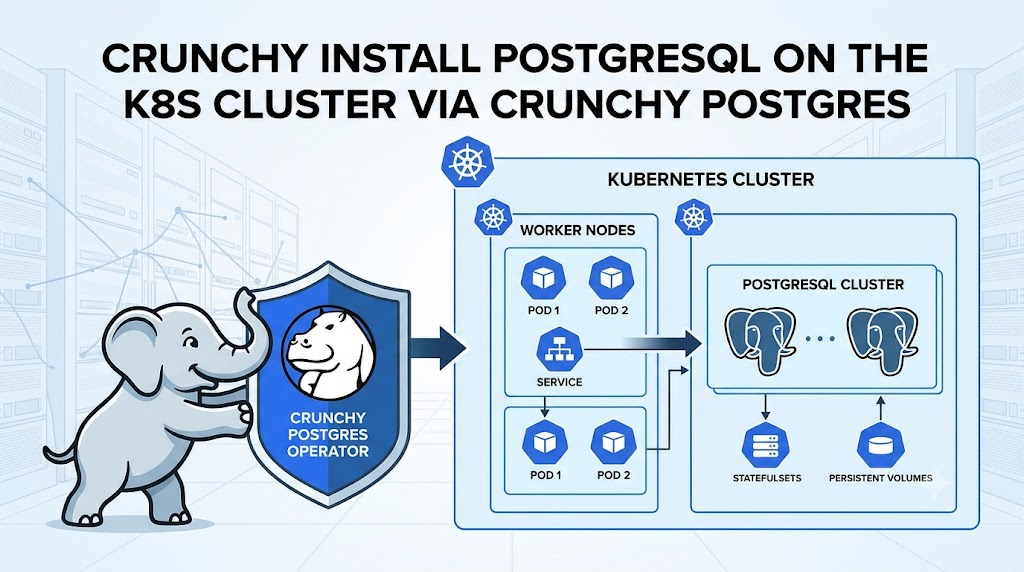
Đại loại thì Crunchy Postgres cung cấp cho chúng ta 1 operator
Từ đó bạn apply 1 Custom Resource: PostgresCluster
Thì Postgres Operator của Crunchy sẽ tạo cho bạn 1 cluster postgresql tương ứng.
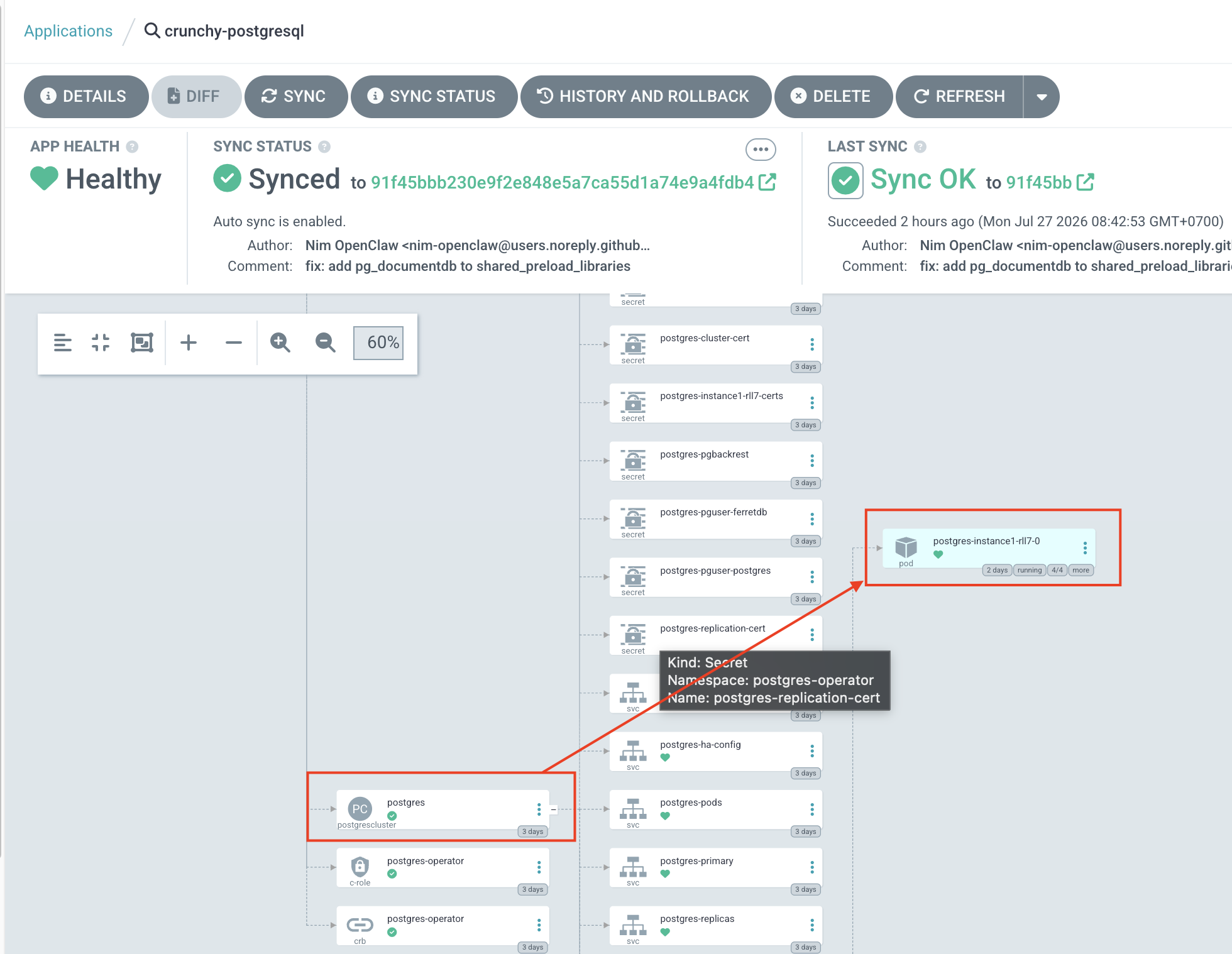
Đầu tiên bạn cần cài đặt Crunchy Postgres Operator
Bạn sẽ thấy file Kustomization.
https://github.com/CrunchyData/postgres-operator/blob/main/config/default/kustomization.yaml
Sau khi cài được Postgres Operator rồi
apiVersion: kustomize.config.k8s.io/v1beta1
kind: Kustomization

namespace: postgres-operator

resources:
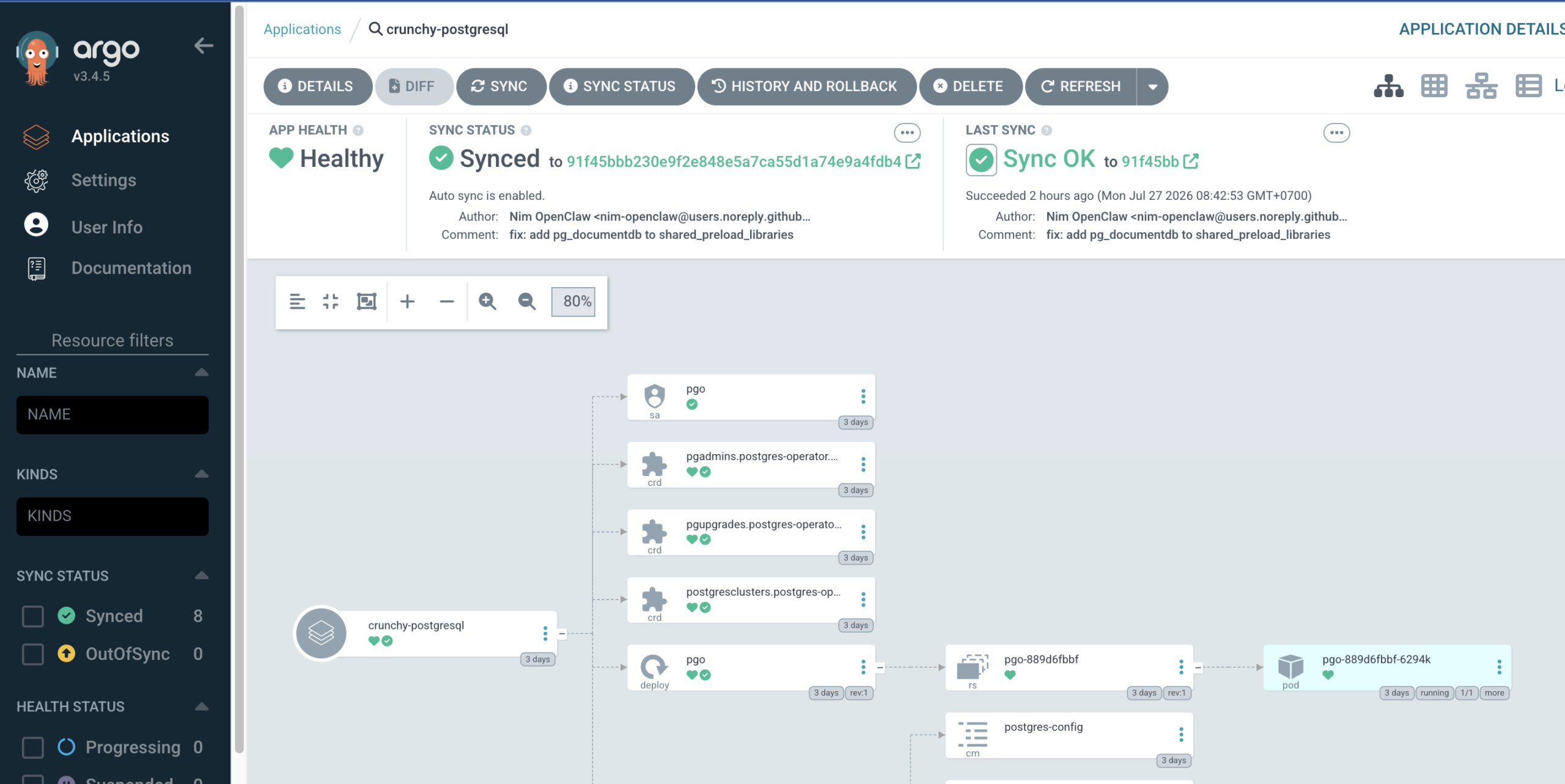
- github.com/CrunchyData/postgres-operator/config/default?ref=v6.0.2Giờ bạn tạo 1 PostgresCluster và tiến anh apply
apiVersion: postgres-operator.crunchydata.com/v1beta1
kind: PostgresCluster
metadata:
  name: postgres
  namespace: postgres-operator
spec:
  # Test deployment explicitly requested by operator.
  # Immutable build tag: preserves Crunchy postgres UID (26) required by PGO init.
  image: antiantiops/crunchy-postgres-documentdb:pg16-documentdb-d2781e5
  postgresVersion: 16
  instances:
    - name: instance1
      replicas: 1
      dataVolumeClaimSpec:
        accessModes:
          - ReadWriteOnce
        storageClassName: longhorn
        resources:
          requests:
            storage: 5Gi
      resources:
        limits:
          cpu: 500m
          memory: 512Mi
        requests:
          cpu: 100m
          memory: 256Mi
  users:
    - name: postgres
      databases:
        - postgres
    - name: ferretdb
      databases:
        - ferretdb
      password:
        type: AlphaNumeric
  patroni:
    dynamicConfiguration:
      postgresql:
        parameters:
          # DocumentDB core is a postmaster module; pg_cron is a DocumentDB dependency.
          shared_preload_libraries: pg_documentdb_core,pg_documentdb,pg_cron
          cron.database_name: ferretdb
          # DocumentDB index workers reconnect locally as this role.
          # Required when PostgreSQL md5/SCRAM authentication is enabled.
          documentdb.localhost_connection_string: "host=localhost user=ferretdb dbname=ferretdb password=oC7bCxxxxxxlN7DTOJ"
        pg_hba:
          - "host all all 0.0.0.0/0 md5"
          - "host all all ::0/0 md5"
  backups:
    pgbackrest:
      repos:
        - name: repo1
          volume:
            volumeClaimSpec:
              accessModes:
                - ReadWriteOnce
              storageClassName: longhorn
              resources:
                requests:
                  storage: 5Gi
Giờ đi vào giải thích từng block:
spec:
  image: antiantiops/crunchy-postgres-documentdb:pg16-documentdb-d2781e5
postgresVersion: 16postgresVersion: 16yêu cầu PostgreSQL major version 16.imagethay image PostgreSQL mặc định của PGO bằng image tùy biến có DocumentDB.- Tag
pg16-documentdb-d2781e5là tag cố định, tốt hơnlatestvì lần triển khai sau sẽ dùng đúng cùng một image.
Dòng comment nói image phải giữ PostgreSQL UID 26. Đây là điểm quan trọng: PGO init container và quyền trên volume có thể phụ thuộc vào UID/GID trong image. Nếu image tự build đổi user/UID, Pod có thể gặp lỗi quyền khi khởi tạo hoặc mount dữ liệu.
Instance PostgreSQL
instances:
  - name: instance1
replicas: 1Tạo một nhóm instance tên instance1.
replicas: 1 nghĩa là chỉ có một Pod PostgreSQL.
Đây là cấu hình phù hợp cho môi trường test/dev, nhưng không có high availability: nếu node hoặc Pod gặp sự cố, database tạm thời không phục vụ được cho tới khi Pod được khôi phục.
dataVolumeClaimSpec:
  accessModes:
    - ReadWriteOnce
  storageClassName: longhorn
  resources:
    requests:
storage: 5GiĐây là PVC chứa dữ liệu database chính:
ReadWriteOnce(RWO): volume được gắn đọc-ghi bởi một node tại một thời điểm; đây là kiểu phổ biến cho PostgreSQL.storageClassName: longhorn: yêu cầu Kubernetes cấp volume qua Longhorn.storage: 5Gi: dung lượng yêu cầu ban đầu là 5 GiB.
Lưu ý: 5 GiB thường khá nhỏ nếu dùng DocumentDB, vì dữ liệu, index, WAL và tăng trưởng database đều cần không gian. Cũng cần xác nhận StorageClass Longhorn của bạn có cho phép mở rộng volume hay không trước khi production.
CPU và RAM
resources:
  limits:
    cpu: 500m
    memory: 512Mi
  requests:
    cpu: 100m
memory: 256MiNgười dùng và database
users:
  - name: postgres
    databases:
- postgresTạo role postgres.
Role này được cấp quyền trên database postgres.
Đây thường là tài khoản quản trị/khởi đầu, nhưng không nên dùng trực tiếp cho ứng dụng.
  - name: ferretdb
    databases:
      - ferretdb
    password:
      type: AlphaNumeric
- Tạo role ứng dụng
ferretdb. - Tạo hoặc gán role này với database
ferretdb. password.type: AlphaNumericyêu cầu operator sinh password gồm ký tự chữ và số, rồi lưu nó trong Kubernetes Secret do PGO quản lý.access.crunchydata
Tên ferretdb gợi ý database này dành cho FerretDB, một lớp tương thích MongoDB chạy trên PostgreSQL/DocumentDB.
Patroni và cấu hình động
patroni:
dynamicConfiguration:PGO dùng Patroni để quản lý lifecycle PostgreSQL, như bootstrap, failover và áp cấu hình runtime. dynamicConfiguration là nơi thêm cấu hình PostgreSQL được Patroni quản lý.
postgresql:
  parameters:
shared_preload_libraries: pg_documentdb_core,pg_documentdb,pg_cronshared_preload_libraries là tham số rất quan trọng:
pg_documentdb_core: nạp phần lõi DocumentDB.pg_documentdb: nạp extension/chức năng DocumentDB.pg_cron: scheduler chạy tác vụ SQL định kỳ.
Các thư viện ở đây phải được preload ngay lúc PostgreSQL khởi động, nên khi thay đổi giá trị này, PostgreSQL cần restart để có hiệu lực. PostgreSQL dùng cơ chế shared_preload_libraries cho các module cần khởi tạo sớm trong server process.
cron.database_name: ferretdb
Chỉ định database mà pg_cron sử dụng để lưu metadata và chạy job.
Do đó, extension và cấu hình pg_cron được định hướng về database ferretdb, thay vì database mặc định postgres.
documentdb.localhost_connection_string: "host=localhost user=ferretdb dbname=ferretdb password=oC7bCxxxxxxlN7DTOJ"Đây là connection string nội bộ để worker của DocumentDB kết nối ngược lại PostgreSQL qua localhost.
Worker dùng role ferretdb và kết nối vào database ferretdb.
Comment cho biết điều này cần thiết khi PostgreSQL đang dùng xác thực password như MD5 hoặc SCRAM.
Quy tắc đăng nhập
pg_hba:
  - "host all all 0.0.0.0/0 md5"
- "host all all ::0/0 md5"pg_hba.conf quy định ai có thể kết nối vào PostgreSQL và dùng cách xác thực nào:
| Dòng | Ý nghĩa |
|---|---|
host all all 0.0.0.0/0 md5 | Cho phép mọi user vào mọi database từ mọi địa chỉ IPv4, dùng xác thực password MD5 |
host all all ::0/0 md5 | Tương tự cho mọi địa chỉ IPv6 |
Cấu hình này rất rộng: bất cứ client nào có đường mạng đến PostgreSQL Service/Pod đều có thể thử đăng nhập bằng bất kỳ role nào. Hãy chỉ giới hạn CIDR mạng của cluster/application, ví dụ 10.42.0.0/16, và ưu tiên SCRAM thay vì MD5 khi toàn bộ client đã hỗ trợ.
Ví dụ hướng chặt hơn:
pg_hba:
  - "host ferretdb ferretdb 10.42.0.0/16 scram-sha-256"
- "host all all 127.0.0.1/32 scram-sha-256"Tuy nhiên, trước khi đổi sang SCRAM, bạn phải bảo đảm password đã được tạo/lưu theo SCRAM và DocumentDB/FerretDB client tương thích.
Backup pgBackRest
backups:
  pgbackrest:
    repos:
- name: repo1- Bật pgBackRest, công cụ backup/restore PostgreSQL mà PGO tích hợp.
repo1là repository backup đầu tiên. PGO hỗ trợ cấu hình repository kiểu volume hoặc object storage tùy triển khai.access.crunchydata
volume:
  volumeClaimSpec:
    accessModes:
      - ReadWriteOnce
    storageClassName: longhorn
    resources:
      requests:
storage: 5GiBackup được lưu trên một PVC Longhorn khác, dung lượng 5 GiB.
Volume backup tách với data volume là đúng, vì xóa hoặc hỏng PVC dữ liệu không đồng nghĩa mất ngay backup.
Luồng hoạt động
Khi apply manifest này, luồng khái quát là:
- PGO thấy resource
PostgresCluster/postgres. - Operator tạo PVC dữ liệu Longhorn 5 GiB và Pod PostgreSQL 16 từ custom image.
- Operator tạo role/database
postgresvàferretdb, đồng thời quản lý Secret mật khẩu. - Patroni áp PostgreSQL parameters, preload DocumentDB và pg_cron, rồi khởi động PostgreSQL.
- PGO tạo một repository pgBackRest trên PVC Longhorn riêng cho backup.
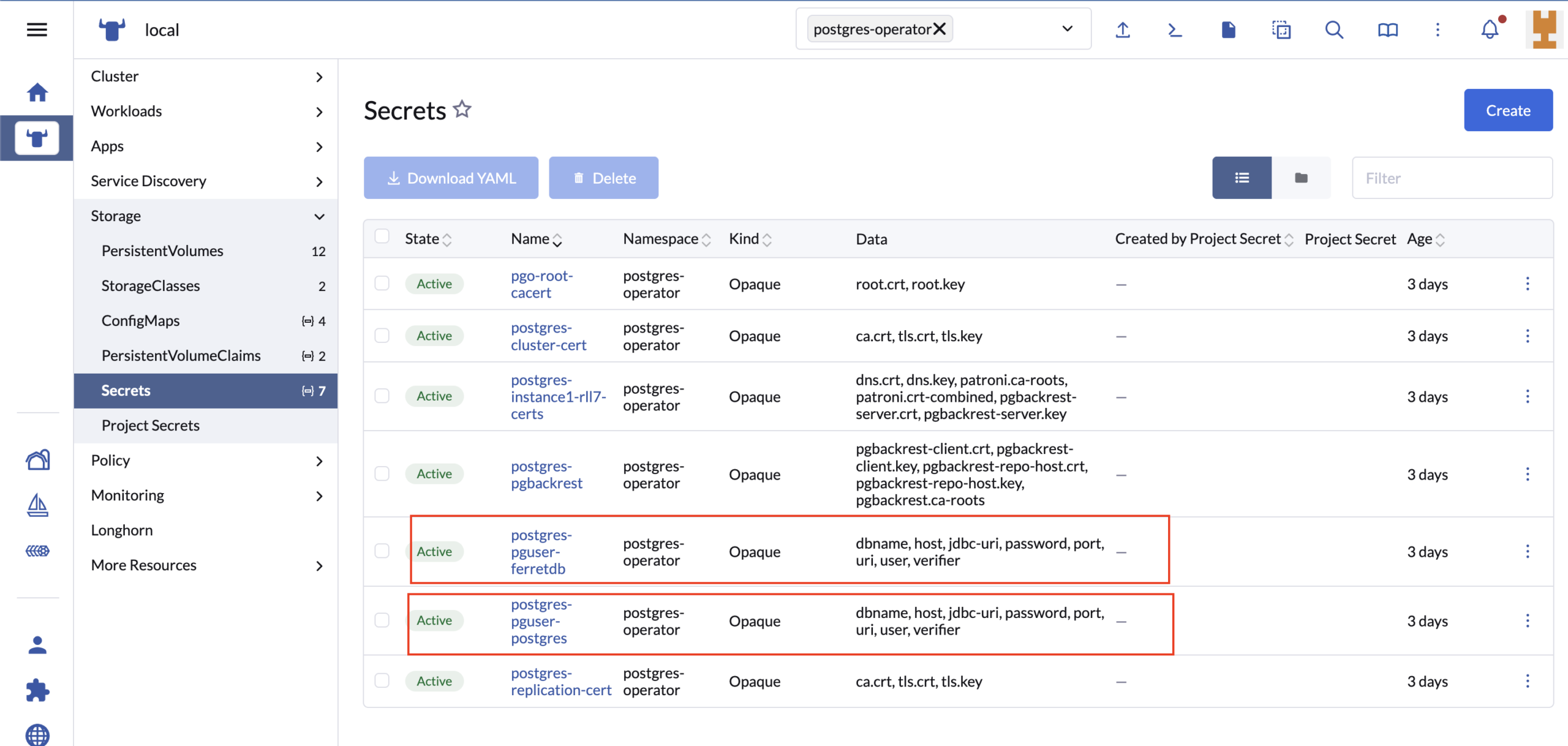
Làm sao để lấy thông tin database để kết nối
Bạn vào phân secret và lấy ra các config liên đến database của bạn.
Các command hữu ích
execute vào trong database chính:
kubectl exec -it \
  -n postgresql-cluster-v2 \
  komodo-v2-postgres-kom-5blv-0 \
-c database -- bashvào trong database và run 1 số query:
psql -U postgres -d ferretdb

SELECT extname, extversion
FROM pg_extension
WHERE extname IN ('documentdb', 'documentdb_core', 'pg_cron')
ORDER BY extname;

SELECT
  has_schema_privilege('ferretdb', 'documentdb_api', 'USAGE')
    AS schema_usage,
  has_function_privilege(
    'ferretdb',
    'documentdb_api.binary_extended_version()',
    'EXECUTE'
) AS can_execute_version_function;Show secret cho dễ đọc:
kubectl get secret -n postgresql-cluster-v2 komodo-v2-pguser-ferretdb -o json | jq '.data | map_values(@base64d)'