Tài liệu ghi lại toàn bộ quy trình nâng cấp stack Kong Gateway từ phiên bản cũ (Kong 3.2.2 + Postgres 11 + Konga UI) lên kiến trúc chuẩn mới (Kong 3.8.0 + Postgres 15 + Kong Manager OSS UI + Basic Auth), kèm theo kiến trúc bảo vệ backend dịch vụ (e.g. WordPress/Elearning).
1. Sơ đồ Kiến trúc Hệ thống (Mermaid)
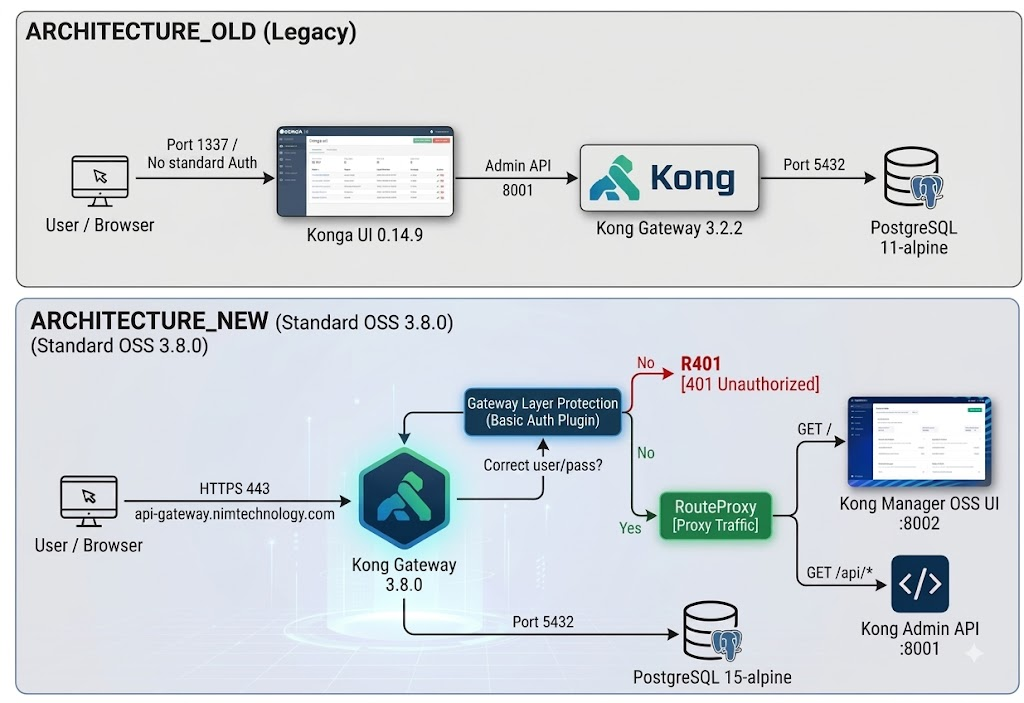
1.1. So sánh Kiến trúc Cũ vs Mới
graph TB
    subgraph Architecture_Old ["Kiến trúc Cũ (Legacy)"]
        UserOld[User / Browser] -->|Port 1337 / Không Auth chuẩn| KongaOld[Konga UI 0.14.9]
        KongaOld -->|Admin API 8001| KongOld[Kong Gateway 3.2.2]
        KongOld -->|Port 5432| PG11[(PostgreSQL 11-alpine)]
    end

    subgraph Architecture_New ["Kiến trúc Mới (Standard OSS 3.8.0)"]
        UserNew[User / Browser] -->|HTTPS 443 api-gateway.nimtechnology.com| KongNew[Kong Gateway 3.8.0]

        subgraph SecurityLayer ["Bảo vệ Lớp Gateway (Basic Auth Plugin)"]
            AuthCheck{Đúng user/pass?}
            AuthCheck -->|No| R401[401 Unauthorized]
            AuthCheck -->|Yes| RouteProxy[Proxy Traffic]
        end

        KongNew --> AuthCheck
        RouteProxy -->|GET /| KM_UI[Kong Manager OSS UI :8002]
        RouteProxy -->|GET /api/*| AdminAPI[Kong Admin API :8001]

        KongNew -->|Port 5432| PG15[(PostgreSQL 15-alpine)]
    end
1.2. Luồng Bảo vệ Dịch vụ Backend (Elearning / WordPress) chống Scan & DDoS
flowchart TD
    ClientReq[Client / Bot Request] -->|HTTPS| KongGW[Kong Gateway 3.8.0]

    subgraph Kong_Inspection ["Kong Gateway Inspection & Protection"]
        GW_CheckBot{Bot / Scanner UA?}
        GW_CheckBot -->|Yes - sqlmap, curl bot, etc.| BlockBot[403 Forbidden by bot-detection]

        GW_CheckBot -->|No| MatchRoute{Match Path?}

        MatchRoute -->|/xmlrpc.php| TerminateXML[403 Forbidden by request-termination]

        MatchRoute -->|/wp-login.php| LoginRate{Rate Limit > 5 req/min?}
        LoginRate -->|Yes| DropLogin[429 Too Many Requests]
        LoginRate -->|No| AllowLogin[Forward to Backend]

        MatchRoute -->|/* General Path| GlobalRate{Rate Limit > 5/s or 60/min?}
        GlobalRate -->|Yes| DropGlobal[429 Too Many Requests]
        GlobalRate -->|No| AllowGlobal[Forward to Backend]
    end

    subgraph Backend_Infrastructure ["Host 192.168.101.35 (Protected)"]
        AllowLogin --> UpstreamElearning[upstream-elearning :8080]
        AllowGlobal --> UpstreamElearning
        UpstreamElearning --> NginxWP[WordPress Nginx / Apache]
        NginxWP --> MariaDB[(MariaDB Safe from OOM/Crash)]
    end
2. Bảng So sánh Thành phần
| Thành phần | Cũ | Mới |
|---|---|---|
| Kong Gateway | kong:3.2.2 | kong:3.8 (3.8.0) |
| Database | postgres:11-alpine | postgres:15-alpine |
| Giao diện Web UI | konga:latest (Port 1337) | Kong Manager OSS chính chủ (Port 8002) |
| Bảo mật Web UI | Login form của Konga | Native Kong basic-auth plugin trên domain |
| Bảo vệ Backend | Không có | bot-detection, rate-limiting, request-termination |
3. Quy trình Thực hiện Chi tiết
Bước 1: Backup Toàn bộ Dữ liệu Cũ
Trước khi thực hiện, tạo bản dump database:
# Dump toàn bộ DB từ container Postgres cũ
docker exec kong-database pg_dumpall -U kong > /home/nim/kong_pg11_backup.sql
Bước 2: Nâng cấp Kong Gateway lên 3.8.0 & Thay thế Konga
2.1. Dừng và xóa container Konga cũ
docker stop konga konga-prepare 2>/dev/null || true
docker rm konga konga-prepare 2>/dev/null || true
2.2. Chạy Kong Migrations lên 3.8
docker run --rm \
  --network kong-net \
  -e "KONG_DATABASE=postgres" \
  -e "KONG_PG_HOST=kong-database" \
  -e "KONG_PG_USER=kong" \
  -e "KONG_PG_PASSWORD=***" \
  kong:3.8 kong migrations up

docker run --rm \
  --network kong-net \
  -e "KONG_DATABASE=postgres" \
  -e "KONG_PG_HOST=kong-database" \
  -e "KONG_PG_USER=kong" \
  -e "KONG_PG_PASSWORD=***" \
  kong:3.8 kong migrations finish
2.3. Dừng Kong cũ và khởi chạy Kong 3.8 với Kong Manager OSS
docker stop kong && docker rm kong

docker run -d --name kong \
  --network kong-net \
  --ip 172.1.1.40 \
  --restart unless-stopped \
  -e "KONG_DATABASE=postgres" \
  -e "KONG_PG_HOST=kong-database" \
  -e "KONG_PG_USER=kong" \
  -e "KONG_PG_PASSWORD=***" \
  -e "KONG_PROXY_ACCESS_LOG=/dev/stdout" \
  -e "KONG_ADMIN_ACCESS_LOG=/dev/stdout" \
  -e "KONG_PROXY_ERROR_LOG=/dev/stderr" \
  -e "KONG_ADMIN_ERROR_LOG=/dev/stderr" \
  -e "KONG_ADMIN_LISTEN=0.0.0.0:8001, 0.0.0.0:8444 ssl" \
  -e "KONG_ADMIN_GUI_LISTEN=0.0.0.0:8002" \
  -e "KONG_ADMIN_GUI_URL=https://api-gateway.nimtechnology.com" \
  -e "KONG_ADMIN_GUI_API_URL=https://api-gateway.nimtechnology.com/api" \
  -p 80:8000 \
  -p 443:8443 \
  -p 8001:8001 \
  -p 8002:8002 \
  kong:3.8
Bước 3: Cấu hình Route & Native Basic Auth cho Web UI
Vì Kong Manager OSS không tích hợp sẵn form login RBAC (tính năng Enterprise), bảo vệ UI khi public ra Internet bằng plugin basic-auth ngay trên proxy route của Kong.
3.1. Cập nhật Upstream và Route Web UI
# 1. Xóa target cũ (Konga 1337) và thêm target mới (Kong Manager 8002)
TARGET_ID=$(curl -s http://127.0.0.1:8001/upstreams/upstream-konga/targets | jq -r ".data[0].id")
curl -X DELETE http://127.0.0.1:8001/upstreams/upstream-konga/targets/$TARGET_ID

curl -i -X POST http://127.0.0.1:8001/upstreams/upstream-konga/targets \
  --data "target=192.168.101.9:8002" \
  --data "weight=100"

# 2. Cập nhật route-konga giữ nguyên path (strip_path=false) để load assets UI
curl -i -X PATCH http://127.0.0.1:8001/routes/route-konga \
  --data "strip_path=false" \
  --data "protocols[]=http" \
  --data "protocols[]=https"
3.2. Tạo Service và Route cho Admin API (/api)
# Tạo service trỏ về Admin API
curl -i -X POST http://127.0.0.1:8001/services \
  --data "name=svc-admin-api" \
  --data "url=http://192.168.101.9:8001"

# Tạo route /api trên domain
curl -i -X POST http://127.0.0.1:8001/services/svc-admin-api/routes \
  --data "name=route-admin-api" \
  --data "hosts[]=api-gateway.nimtechnology.com" \
  --data "paths[]=/api" \
  --data "strip_path=true" \
  --data "protocols[]=http" \
  --data "protocols[]=https"
3.3. Tạo Consumer và Bật Plugin Basic Auth
# 1. Tạo consumer admin (nếu chưa có)
curl -i -X POST http://127.0.0.1:8001/consumers \
  --data "username=admin"

# 2. Đặt mật khẩu Basic Auth
curl -i -X POST http://127.0.0.1:8001/consumers/admin/basic-auth \
  --data "username=admin" \
  --data "password=<YOUR_SECURE_PASSWORD>"

# 3. Gán plugin basic-auth lên route UI và route API
curl -i -X POST http://127.0.0.1:8001/routes/route-konga/plugins \
  --data "name=basic-auth" \
  --data "config.hide_credentials=false"

curl -i -X POST http://127.0.0.1:8001/routes/route-admin-api/plugins \
  --data "name=basic-auth" \
  --data "config.hide_credentials=false"
Bước 4: Nâng cấp Database từ Postgres 11 lên Postgres 15
4.1. Dừng Kong & Postgres 11, backup thư mục data
docker stop kong kong-database
docker rm kong-database

mv /home/docker/postgres-kongapi /home/docker/postgres-kongapi-pg11-backup
mkdir -p /home/docker/postgres-kongapi
chown -R 70:70 /home/docker/postgres-kongapi
4.2. Khởi chạy Postgres 15
docker run -d --name kong-database \
  --network kong-net \
  --ip 172.1.1.2 \
  --restart unless-stopped \
  -e "POSTGRES_USER=kong" \
  -e "POSTGRES_PASSWORD=***" \
  -e "POSTGRES_DB=kong" \
  -v /home/docker/postgres-kongapi:/var/lib/postgresql/data \
  -p 5432:5432 \
  postgres:15-alpine
4.3. Restore dữ liệu vào Postgres 15
# Chờ Postgres 15 sẵn sàng
docker exec kong-database pg_isready -U kong

# Restore dump
docker exec -i kong-database psql -U kong -d postgres < /home/nim/kong_pg11_backup.sql

# Khởi động lại Kong
docker start kong
Bước 5: Cấu hình Bảo vệ Dịch vụ Backend (Elearning / WordPress)
# 1. Chặn đứng /xmlrpc.php ngay tại Gateway
curl -i -X POST http://127.0.0.1:8001/services/svc-elearning/routes \
  --data "name=route-elearning-xmlrpc" \
  --data "hosts[]=e-learning.nimtechnology.com" \
  --data "paths[]=/xmlrpc.php"

curl -i -X POST http://127.0.0.1:8001/routes/route-elearning-xmlrpc/plugins \
  --data "name=request-termination" \
  --data "config.status_code=403" \
  --data "config.message=XMLRPC disabled for security"

# 2. Rate limit chặt chẽ cho /wp-login.php (5 req/phút)
curl -i -X POST http://127.0.0.1:8001/services/svc-elearning/routes \
  --data "name=route-elearning-login" \
  --data "hosts[]=e-learning.nimtechnology.com" \
  --data "paths[]=/wp-login.php"

curl -i -X POST http://127.0.0.1:8001/routes/route-elearning-login/plugins \
  --data "name=rate-limiting" \
  --data "config.minute=5" \
  --data "config.policy=local" \
  --data "config.limit_by=ip"

# 3. Chống bot scanner & Rate limiting toàn service elearning
curl -i -X POST http://127.0.0.1:8001/services/svc-elearning/plugins \
  --data "name=bot-detection"

curl -i -X POST http://127.0.0.1:8001/services/svc-elearning/plugins \
  --data "name=rate-limiting" \
  --data "config.second=5" \
  --data "config.minute=60" \
  --data "config.policy=local" \
  --data "config.limit_by=ip"
4. Kiểm tra và Nghiệm thu
# 1. Kiểm tra trạng thái Kong & Database
curl -s http://127.0.0.1:8001/status

# 2. Kiểm tra truy cập không có auth (phải trả 401 Unauthorized)
curl -I -k "https://127.0.0.1/" -H "Host: api-gateway.nimtechnology.com"

# 3. Kiểm tra truy cập có Basic Auth (phải trả 200 OK)
curl -I -k -u admin:<YOUR_PASSWORD> "https://127.0.0.1/" -H "Host: api-gateway.nimtechnology.com"

# 4. Kiểm tra chặn xmlrpc trên elearning (phải trả 403 Forbidden)
curl -i -k "https://127.0.0.1/xmlrpc.php" -H "Host: e-learning.nimtechnology.com"