1) Amazon ElastiCache Overview
Amazon ElastiCache Overview:
• The same way RDS is to get managed Relational Databases…
• ElastiCache is to get managed Redis or Memcached
• Caches are in-memory databases with really high performance, low latency
• Helps reduce load off of databases for read intensive workloads
• Helps make your application stateless
• AWS takes care of OS maintenance / patching, optimizations, setup, configuration, monitoring, failure recovery and backups
• Using ElastiCache involves heavy application code changes
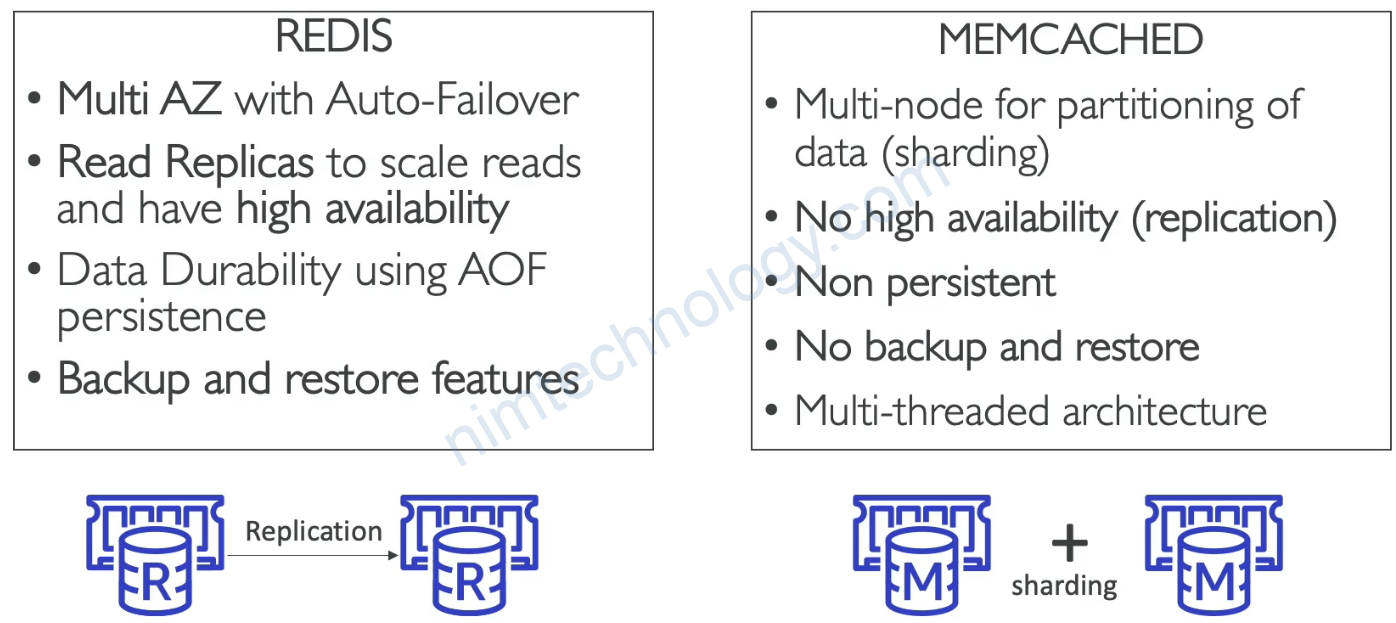
2) ElastiCache – Redis vs Memcached
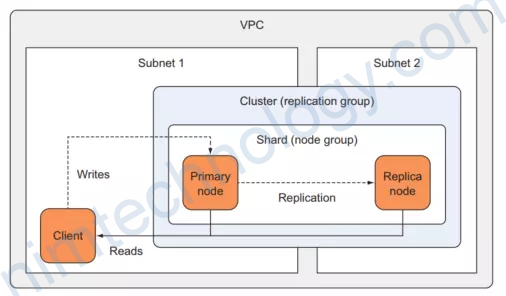
3) Redis Cluster Mode Disabled
ta sẽ có một Redis Cluster chỉ có 1 Shard với số lượng node của Shard là 1 tới 6 node.
https://viblo.asia/p/aws-elasticache-provisioning-with-terraform-x7Z4D6xoLnX
3.1) Create VPC for Redis Cluster
Ở đây chúng ta sẽ tạo VPC vì trong thực tế chả bao giờ chúng ta sử dụng VPC default cả.
>>>>>>>>>>
>>>c1-01-variables.tf
>>>>>>>>>>

# Input Variables
# AWS Region
variable "aws_region" {
  description = "Region in which AWS Resources to be created"
  type = string
  default = "us-east-1"
}

variable "env" {
  description = "Environment in which AWS Resources to be created"
  type = string
  default = "develop"
}

locals {
  name = "nimtechnology"
  common_tags = {
    Component   = "nimtechnology"
    Environment = var.env
  }
  redis_cluster_name = "${local.name}-${var.cluster_name}"
}

variable "cluster_name" {
  default = "aws-redis"
}

# VPC CIDR Block
variable "vpc_cidr_block" {
  description = "VPC CIDR Block"
  type = string
  default = "10.0.0.0/16"
}

# VPC Database Subnets
variable "vpc_elasticache_subnets" {
  description = "VPC Redis Subnets"
  type = list(string)
  default = ["10.0.151.0/24", "10.0.152.0/24"]
}

# VPC Create Database Subnet Group (True / False)
variable "vpc_create_elasticache_subnet_group" {
  description = "VPC Create Redis Subnet Group"
  type = bool
  default = true
}

# VPC Create Database Subnet Route Table (True or False)
variable "vpc_create_elasticache_subnet_route_table" {
  description = "VPC Create Redis Subnet Route Table"
  type = bool
  default = true
}

# VPC Public Subnets
variable "vpc_public_subnets" {
  description = "VPC Public Subnets"
  type = list(string)
  default = ["10.0.101.0/24", "10.0.102.0/24"]
}

# VPC Private Subnets
variable "vpc_private_subnets" {
  description = "VPC Private Subnets"
  type = list(string)
  default = ["10.0.1.0/24", "10.0.2.0/24"]
}

# VPC Enable NAT Gateway (True or False)
variable "vpc_enable_nat_gateway" {
  description = "Enable NAT Gateways for Private Subnets Outbound Communication"
  type = bool
  default = true
}

# VPC Single NAT Gateway (True or False)
variable "vpc_single_nat_gateway" {
  description = "Enable only single NAT Gateway in one Availability Zone to save costs during our demos"
  type = bool
  default = true
}
Chúng ta sử dụng module VPC
>>>>>>>>>>>>>
>>>>c1-02-vpc.tf
>>>>>>>>>>>>>

# AWS Availability Zones Datasource
data "aws_availability_zones" "available" {
}

# Create VPC Terraform Module
module "vpc" {
  source  = "terraform-aws-modules/vpc/aws"
  #version = "3.11.0"
  version = "~> 3.11"

  # VPC Basic Details
  name = local.redis_cluster_name
  cidr = var.vpc_cidr_block
  azs             = data.aws_availability_zones.available.names
  public_subnets  = var.vpc_public_subnets
  private_subnets = var.vpc_private_subnets

  #Elasticache Subnets
  elasticache_subnets = var.vpc_elasticache_subnets
  create_elasticache_subnet_group = var.vpc_create_elasticache_subnet_group
  create_elasticache_subnet_route_table = var.vpc_create_elasticache_subnet_route_table
  # create_elasticache_internet_gateway_route = true
  # create_elasticache_nat_gateway_route = true

  # NAT Gateways - Outbound Communication
  enable_nat_gateway = var.vpc_enable_nat_gateway
  single_nat_gateway = var.vpc_single_nat_gateway

  # VPC DNS Parameters
  enable_dns_hostnames = true
  enable_dns_support   = true


  tags = local.common_tags
  vpc_tags = local.common_tags

  # Additional Tags to Subnets
  public_subnet_tags = {
    Type = "Public Subnets"
    "kubernetes.io/role/elb" = 1
    "kubernetes.io/cluster/${local.redis_cluster_name}" = "shared"
  }
  private_subnet_tags = {
    Type = "private-subnets"
    "kubernetes.io/role/internal-elb" = 1
    "kubernetes.io/cluster/${local.redis_cluster_name}" = "shared"
  }

  elasticache_subnet_tags = {
    Type = "database-subnets"
  }
}
3.2) Install Redis Cluster Mode Disabled on AWS by terraform
c2-01-redis-variables.tf
>>>>>>>>>>>>>>>>>>>>>>>>>>>>

//checked
variable "family" {
  type = string
  default = "redis5.0"
}

//checked
variable "cache_identifier" {
  default = "redis-cluster-mode-enable-nimtechnology"
}

//checked
variable "automatic_failover_enabled" {
  default = true
}

//checked
variable "multi_az_enabled" {
  default = true
}

variable "alarm_memory_threshold" {
  # 10MB
  default = "10000000"
}

variable "alarm_cpu_threshold" {
  default = "75"
}

//checked
variable "desired_clusters" {
  default = "3"
}

//checked
variable "instance_type" {
  default = "cache.t2.micro"
}

//checked
variable "engine_version" {
  default = "5.0.6"
}

//checked
variable "maintenance_window" {
  default = "sun:02:30-sun:03:30"
}

//checked
variable "at_rest_encryption_enabled" {
  type        = bool
  default     = true
  description = "Enable encryption at rest"
}

//checked
variable "transit_encryption_enabled" {
  type        = bool
  default     = true
  description = <<-EOT
    Set `true` to enable encryption in transit. Forced `true` if `var.auth_token` is set.
    If this is enabled, use the [following guide](https://docs.aws.amazon.com/AmazonElastiCache/latest/red-ug/in-transit-encryption.html#connect-tls) to access redis.
    EOT
}

//checked
variable "sns_topic_name" {
  type = string
  default = "Unknown"
}
Chúng ta tạo security Group để các Instance khác connect vào redis
#
# Security group resources
#
resource "aws_security_group" "redis" {
  vpc_id = module.vpc.vpc_id

  ingress {
    from_port   = 6379
    to_port     = 6379
    protocol    = "tcp"
    cidr_blocks = ["0.0.0.0/0"]
  }


  egress {
    from_port   = 0
    to_port     = 0
    protocol    = "-1"
    cidr_blocks = ["0.0.0.0/0"]
  }

  #https://stackoverflow.com/questions/43980946/define-tags-in-central-section-in-terraform
  tags = merge(
    local.common_tags,
    tomap({
      "Name"      = "sgCacheCluster" ##look into
    })
  )

  # the "map" function was deprecated in Terraform v0.12
  # tags = merge(
  #   local.common_tags,
  #   map(
  #     "Name", "sgCacheCluster",
  #     "Project", var.project,
  #   )
  # )

  lifecycle {
      create_before_destroy = true
  }

}
Tiếp đến là Redis
>>>>>>>>>>>>>>>>
>>>>
c2-03-redis.tf
>>>>>

resource "aws_sns_topic" "redis" {
  name = var.sns_topic_name

}

# #https://registry.terraform.io/providers/hashicorp/aws/latest/docs/resources/elasticache_parameter_group
resource "aws_elasticache_parameter_group" "redis" {
  name   = "cache-params"
  family = var.family

  parameter {
    name  = "activerehashing"
    value = "yes"
  }
  parameter {
    name  = "notify-keyspace-events"
    value = "KEA"
  }
}

# #
# # ElastiCache resources
# #
resource "aws_elasticache_replication_group" "redis" {
  replication_group_id          = lower(var.cache_identifier)
  description = "${var.env}-nimtechnology"
  automatic_failover_enabled    = var.automatic_failover_enabled
  multi_az_enabled              = var.multi_az_enabled
  #availability_zones            =  var.availability_zones == [] ? null : var.availability_zones
#   preferred_cache_cluster_azs  = module.vpc.azs

  num_cache_clusters         = var.desired_clusters
  node_type                     = var.instance_type
  engine_version                = var.engine_version
  parameter_group_name          = aws_elasticache_parameter_group.redis.name
  subnet_group_name             = module.vpc.elasticache_subnet_group_name
  security_group_ids            = [aws_security_group.redis.id]
  maintenance_window            = var.maintenance_window
  notification_topic_arn        = aws_sns_topic.redis.arn
  port                          = "6379"

  # cluster_mode {
  #   replicas_per_node_group = 1
  #   num_node_groups         = 2
  # }

  at_rest_encryption_enabled    = var.at_rest_encryption_enabled
  transit_encryption_enabled    = var.transit_encryption_enabled

  tags = merge(
    local.common_tags,
    tomap({
      "Name"    = "CacheReplicationGroup"
    })
  )

}

#
# CloudWatch resources
#
resource "aws_cloudwatch_metric_alarm" "cache_cpu" {
  count = var.desired_clusters

  alarm_name          = "alarm${var.env}CacheCluster00${count.index + 1}CPUUtilization"
  alarm_description   = "Redis cluster CPU utilization"
  comparison_operator = "GreaterThanThreshold"
  evaluation_periods  = "1"
  metric_name         = "CPUUtilization"
  namespace           = "AWS/ElastiCache"
  period              = "300"
  statistic           = "Average"

  threshold = var.alarm_cpu_threshold

  dimensions = {
    CacheClusterId = "${aws_elasticache_replication_group.redis.id}-00${count.index + 1}"
  }

  alarm_actions = [aws_sns_topic.redis.arn]

}

resource "aws_cloudwatch_metric_alarm" "cache_memory" {
  count = var.desired_clusters

  alarm_name          = "alarm${var.env}CacheCluster00${count.index + 1}FreeableMemory"
  alarm_description   = "Redis cluster freeable memory"
  comparison_operator = "LessThanThreshold"
  evaluation_periods  = "1"
  metric_name         = "FreeableMemory"
  namespace           = "AWS/ElastiCache"
  period              = "60"
  statistic           = "Average"

  threshold = var.alarm_memory_threshold

  dimensions = {
    CacheClusterId = "${aws_elasticache_replication_group.redis.id}-00${count.index + 1}"
  }

  alarm_actions = [aws_sns_topic.redis.arn]

}
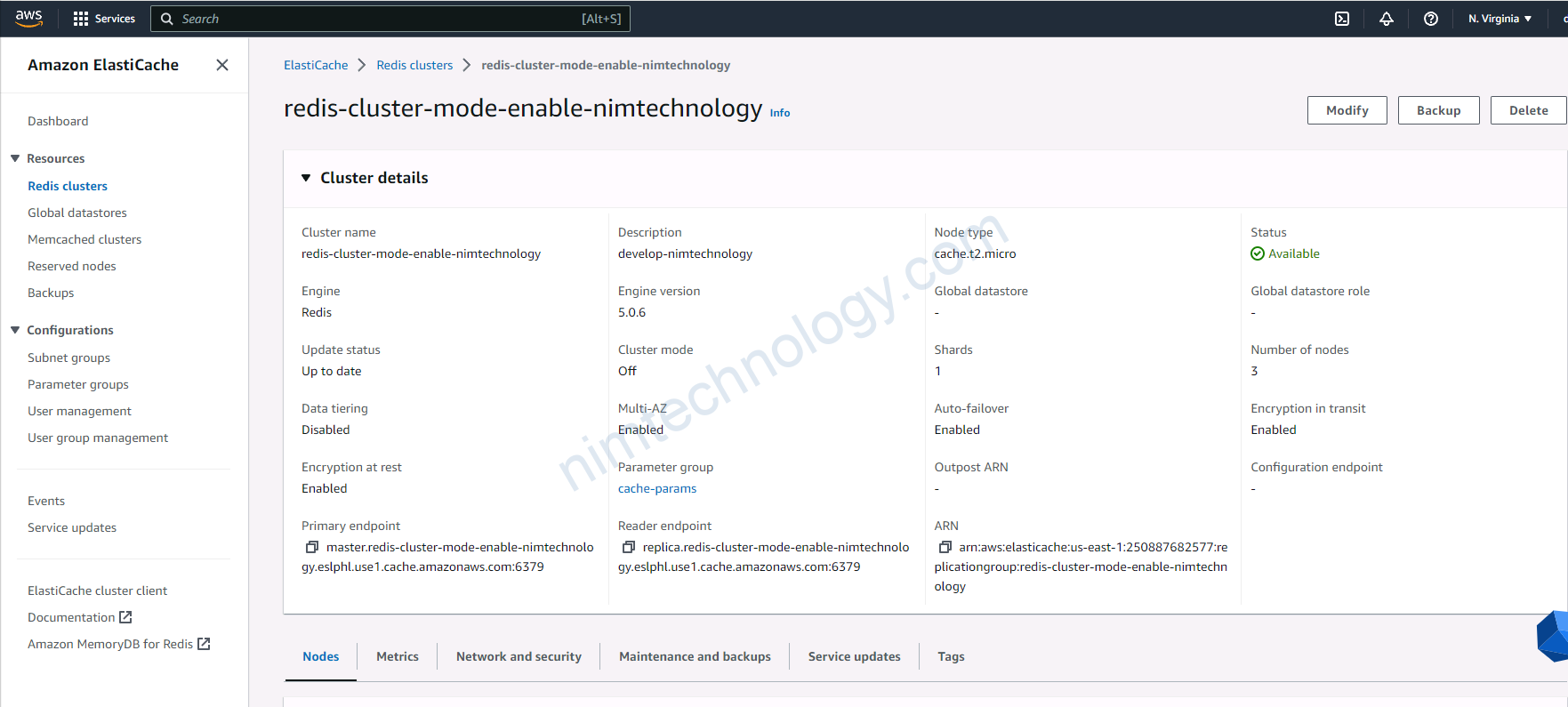
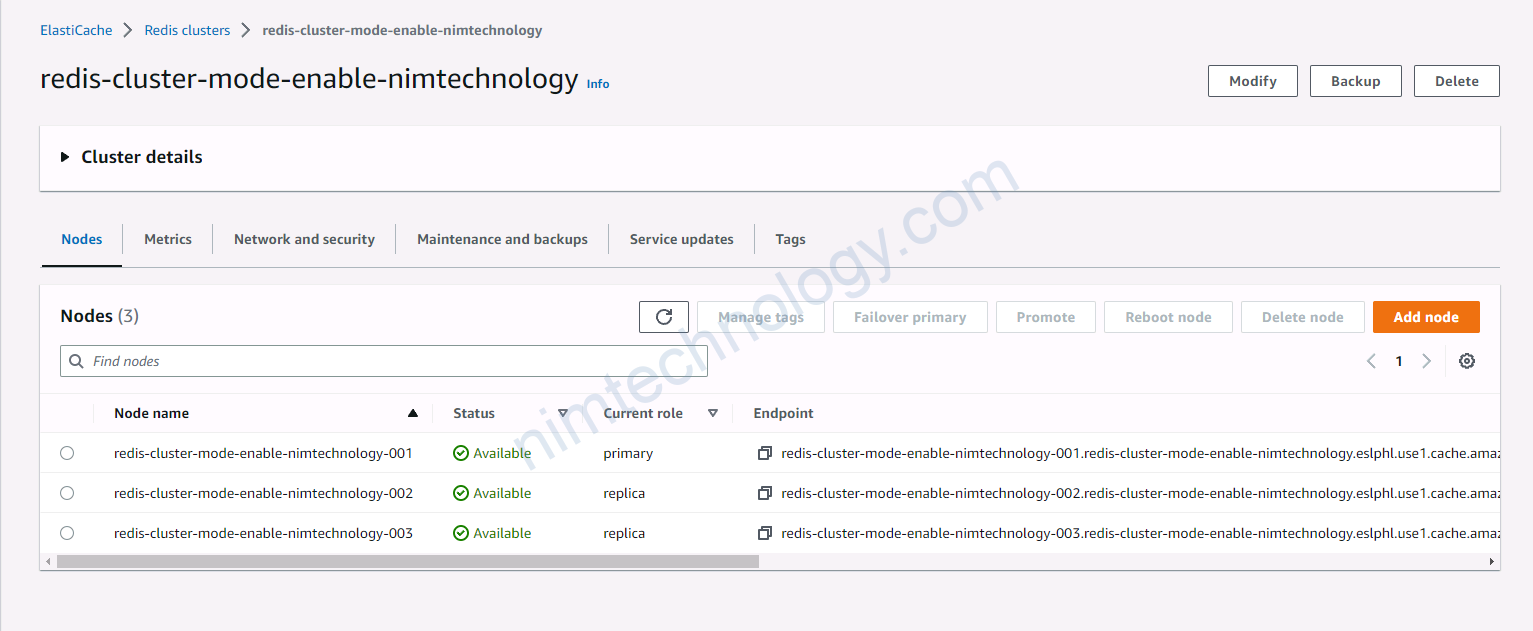
Và sau đây là 1 số hình ảnh trên was
4) Using module terraform to deploy Redis cluster on AWS
Hiện tại mình đang có public 1 module để create redis cluster.
https://registry.terraform.io/modules/mrnim94/elasticache/aws/latest
Pay attention to…
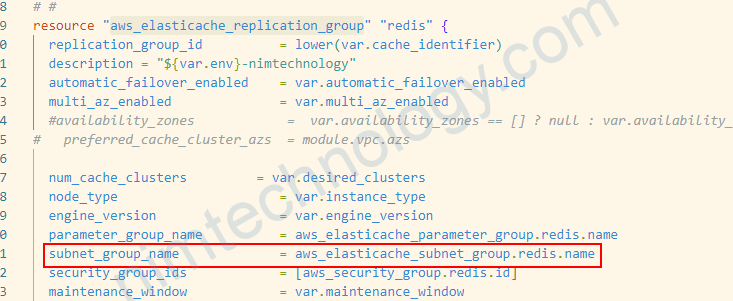
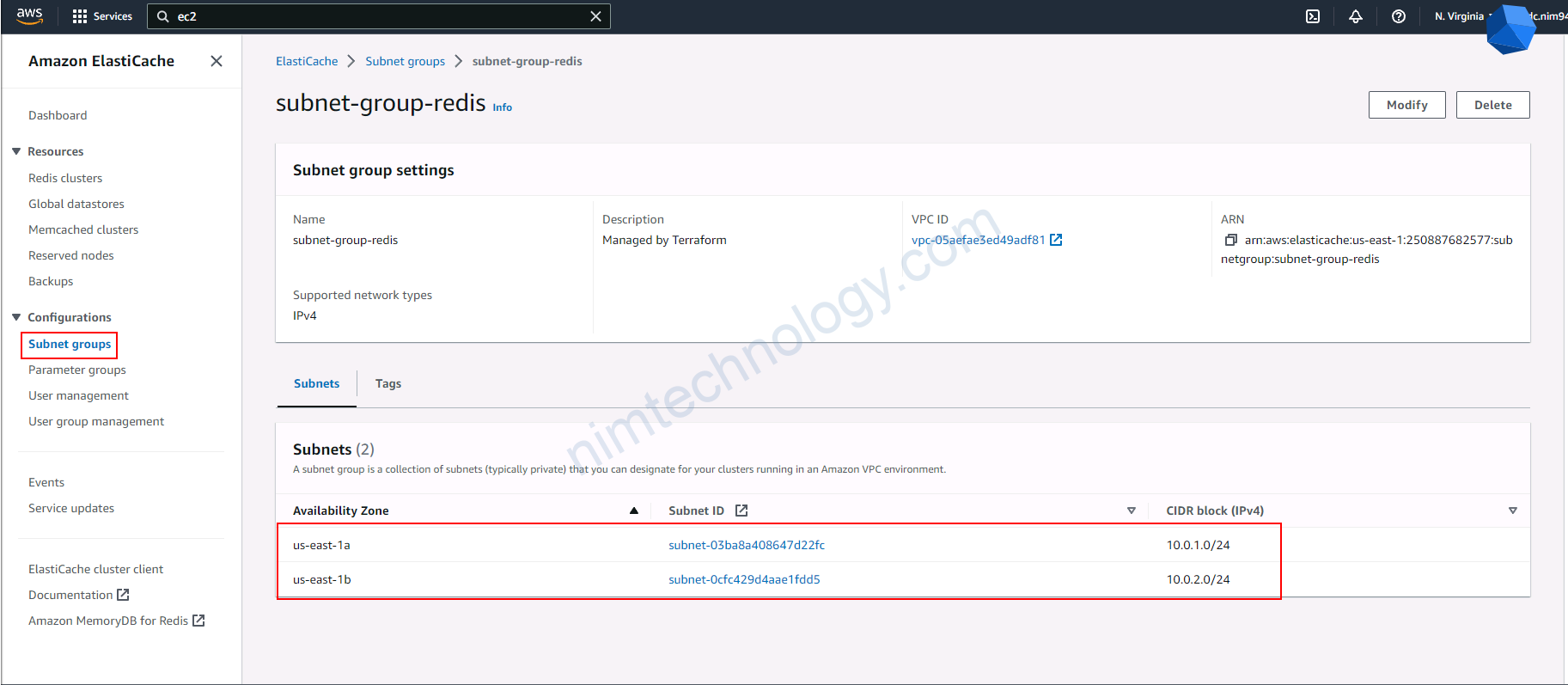
Để tạo được elasticache thì bạn cần tạo 1 thứ là Subnet Group trên Elasticache
Tại sao mình nói vậy?
Nhìn ảnh bên dưới tab Network and Security.

Chúng ta sẽ thấy ở left menu có Subnet Group có thấy subnet
Do chúng ta hay sử dụng terraform có khi chúng ta ko để ý:
Create ElastiCache Subnet Group by VPC Module.
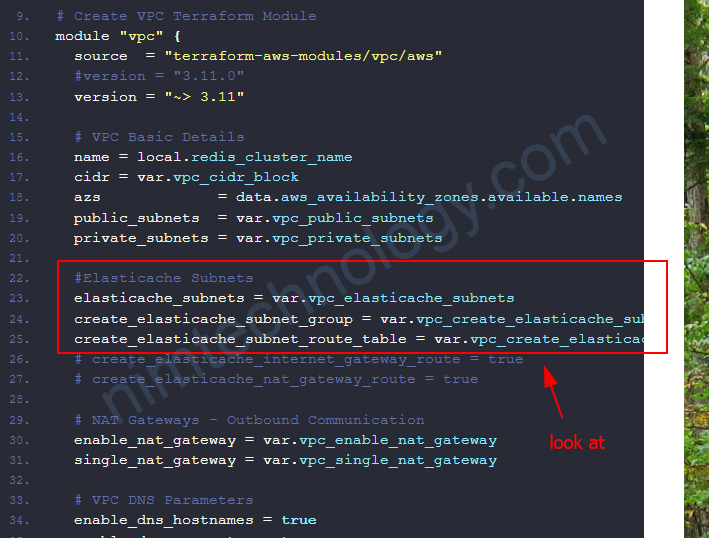
module "vpc" {
  source  = "terraform-aws-modules/vpc/aws"
  #version = "3.11.0"
  version = "~> 3.11"

  #Elasticache Subnets
  elasticache_subnets = var.vpc_elasticache_subnets
  create_elasticache_subnet_group = var.vpc_create_elasticache_subnet_group
  create_elasticache_subnet_route_table = var.vpc_create_elasticache_subnet_route_table
  # create_elasticache_internet_gateway_route = true
  # create_elasticache_nat_gateway_route = true

  elasticache_subnet_tags = {
    Type = "database-subnets"
  }
}
Point ElastiCache Subnet Group base on the existed subnet.
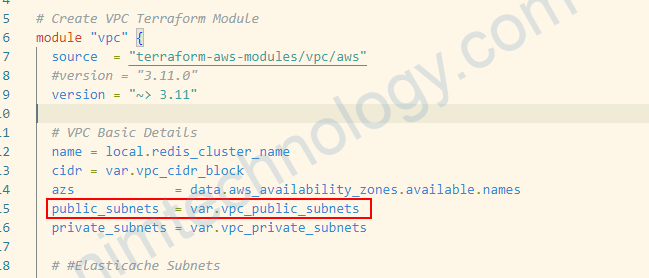
module "vpc" {
  source  = "terraform-aws-modules/vpc/aws"
  #version = "3.11.0"
  version = "~> 3.11"

  # VPC Basic Details
  name = local.redis_cluster_name
  cidr = var.vpc_cidr_block
  azs             = data.aws_availability_zones.available.names
  public_subnets  = var.vpc_public_subnets
  private_subnets = var.vpc_private_subnets
Bạn tạo ElastiCache Subnet Group
resource "aws_elasticache_subnet_group" "redis" {
  name       = "subnet-group-redis"
  subnet_ids = module.vpc.private_subnets
}
Bạn khai báo trong aws_elasticache_replication_group