Skip to content

NimTechnology

Trình bày các công nghệ CLOUD một cách dễ hiểu.

  • Kubernetes & Container
    • Docker
    • Kubernetes
      • Gateway API
      • Ingress
      • Pod
    • Helm Chart
    • OAuth2 Proxy
    • Isito-EnvoyFilter
    • Apache Kafka
      • Kafka
      • Kafka Connect
      • Lenses
    • Vault
    • Longhorn – Storage
    • VictoriaMetrics
    • MetalLB
    • Kong Gateway
  • CI/CD
    • ArgoCD
    • ArgoWorkflows
    • Argo Events
    • Spinnaker
    • Jenkins
    • Harbor
    • TeamCity
    • Git
      • Bitbucket
  • Coding
    • DevSecOps
    • Terraform
      • GCP – Google Cloud
      • AWS – Amazon Web Service
      • Azure Cloud
    • Golang
    • Laravel
    • Python
    • Jquery & JavaScript
    • Selenium
  • Log, Monitor & Tracing
    • DataDog
    • Prometheus
    • Grafana
    • ELK
      • Kibana
      • Logstash
  • BareMetal
    • NextCloud
  • Toggle search form

[Azure] How to generate Access Token and Refresh Token of Azure.

Posted on March 6, 2024March 7, 2024 By nim No Comments on [Azure] How to generate Access Token and Refresh Token of Azure.

Bài này sẽ hướng dẫn chúng ta cách lấy access token và refesh token của azure bằng command

Contents

Toggle
  • 1) Create an Application on Azure.
  • Generate Authorization Code (One time).
  • Get an auth token and a refresh token
  • Generate new Access Token From a refresh token

1) Create an Application on Azure.

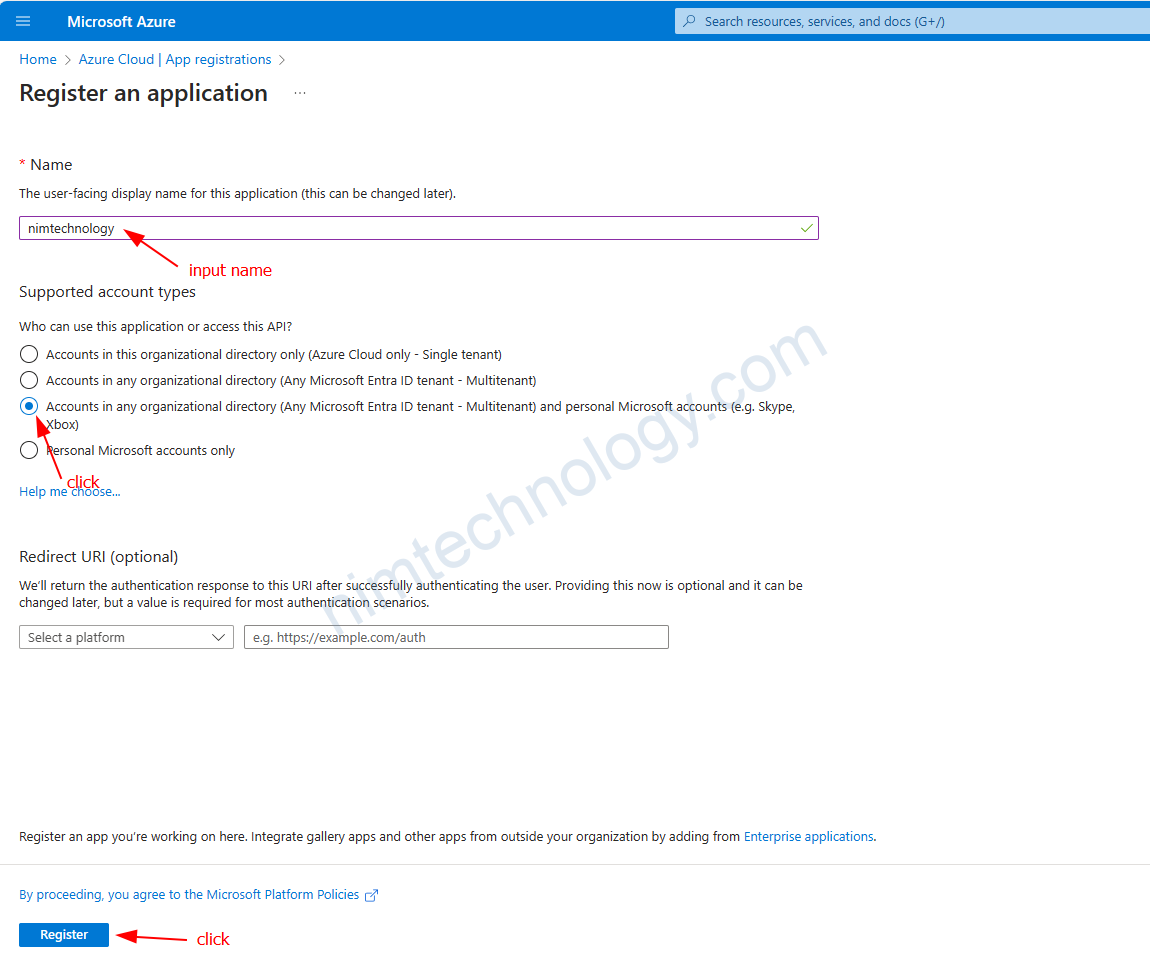
Đầu tiên bạn cần tạo application:
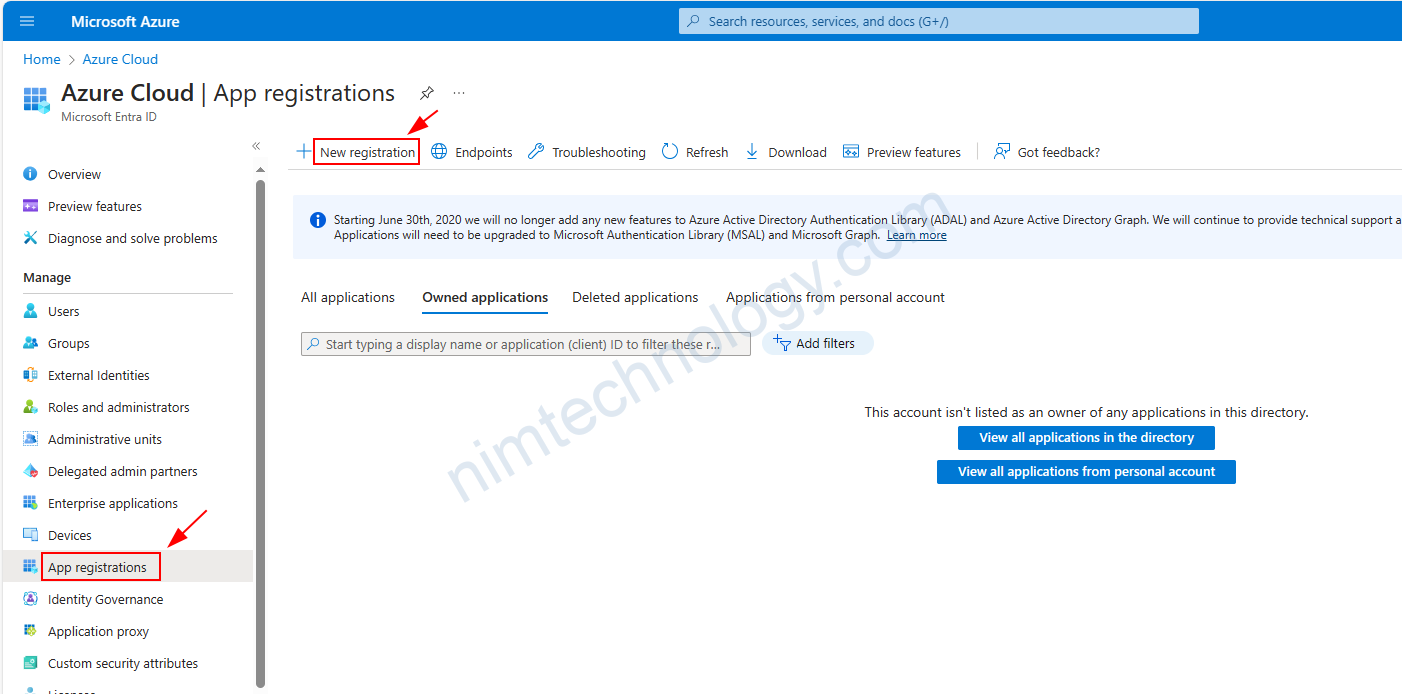
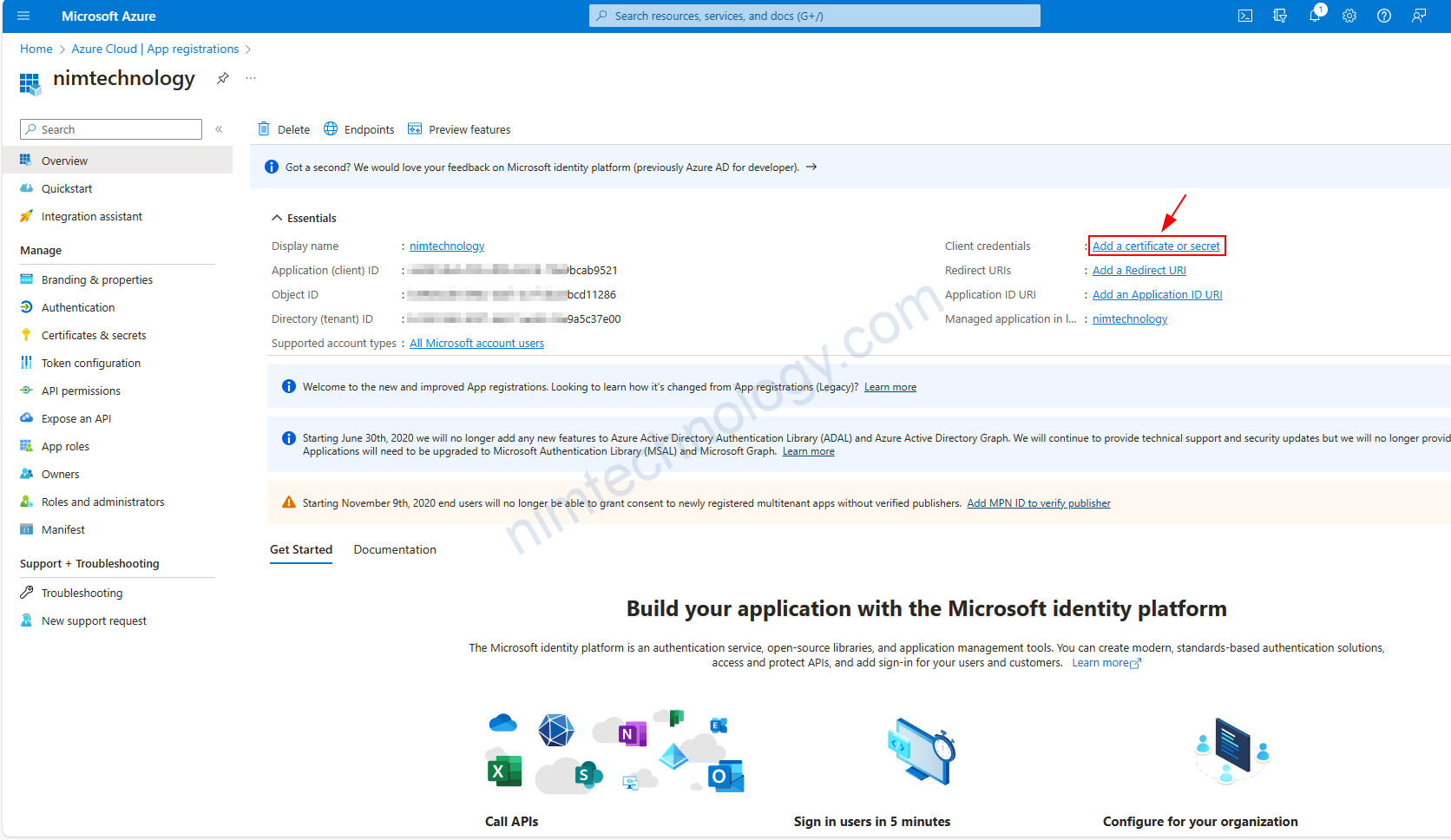
và dưới đây là thành quả
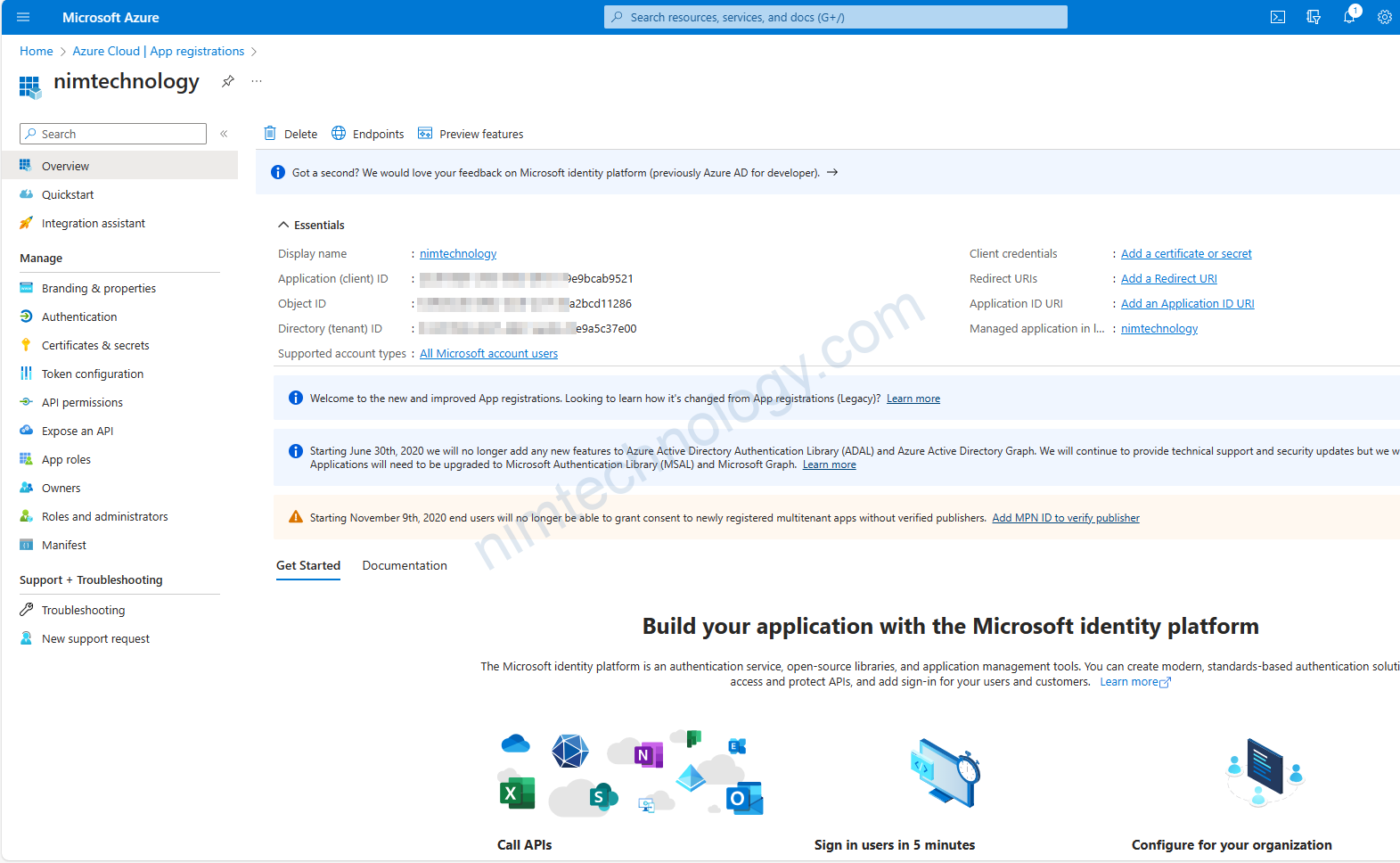
Tiếp đến bạn cần click vào “add certificate and secret” để tại client secret.
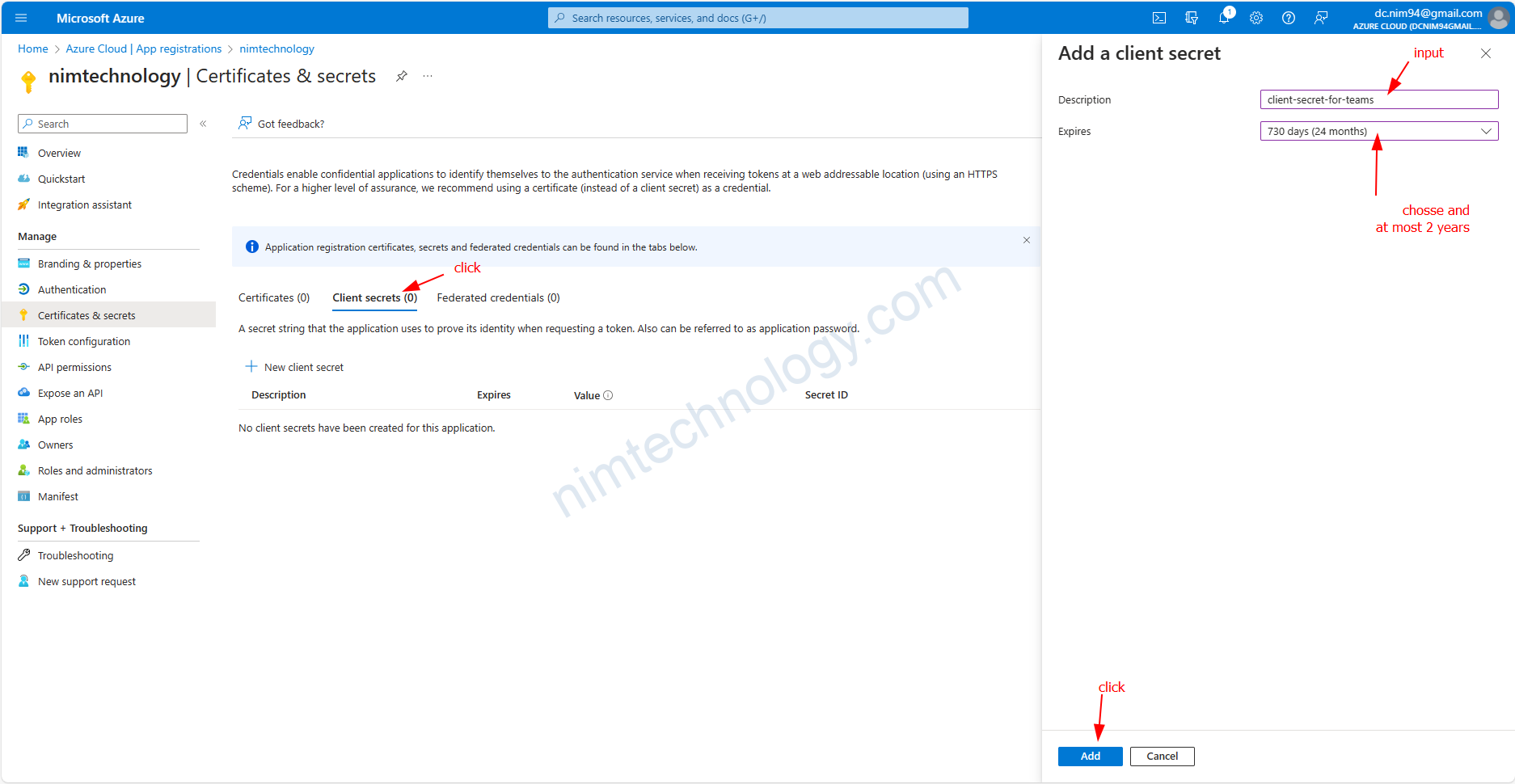
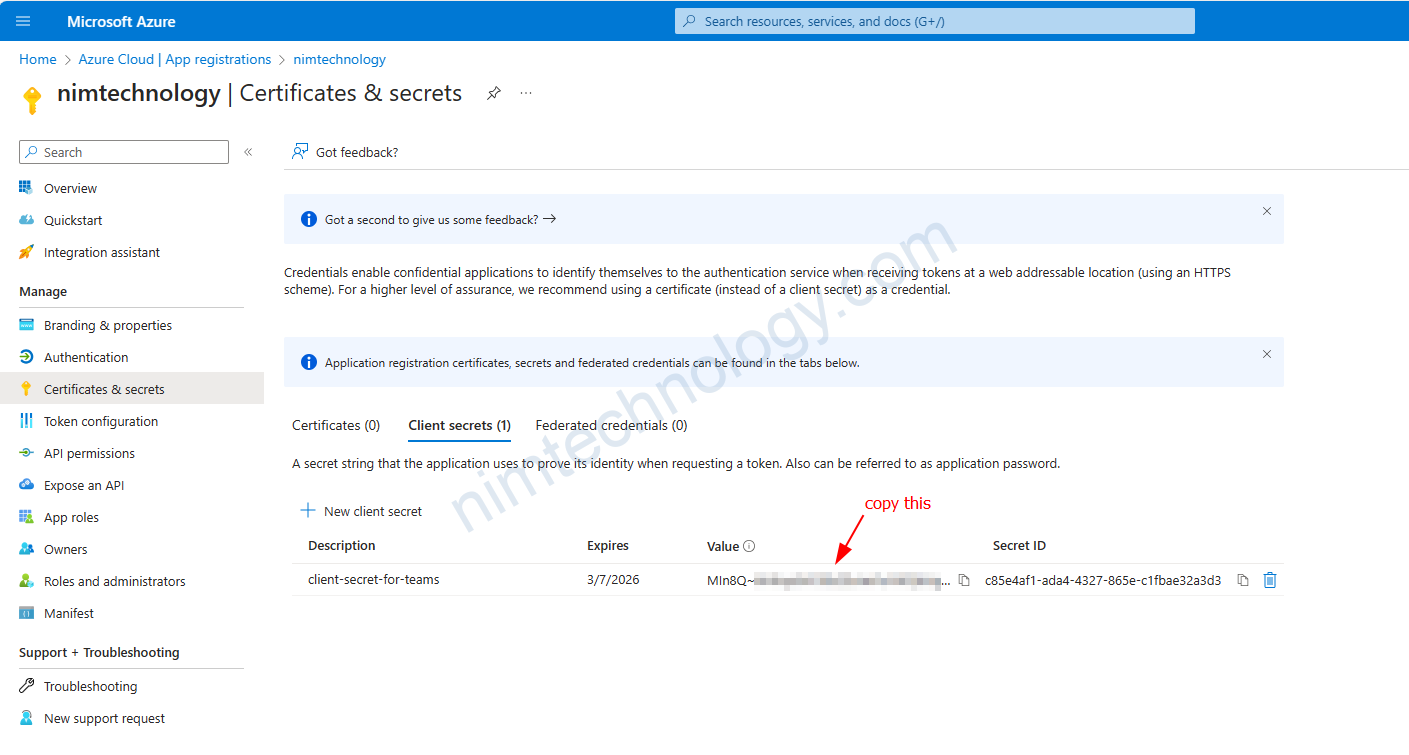
Và bạn sẽ cần copy value

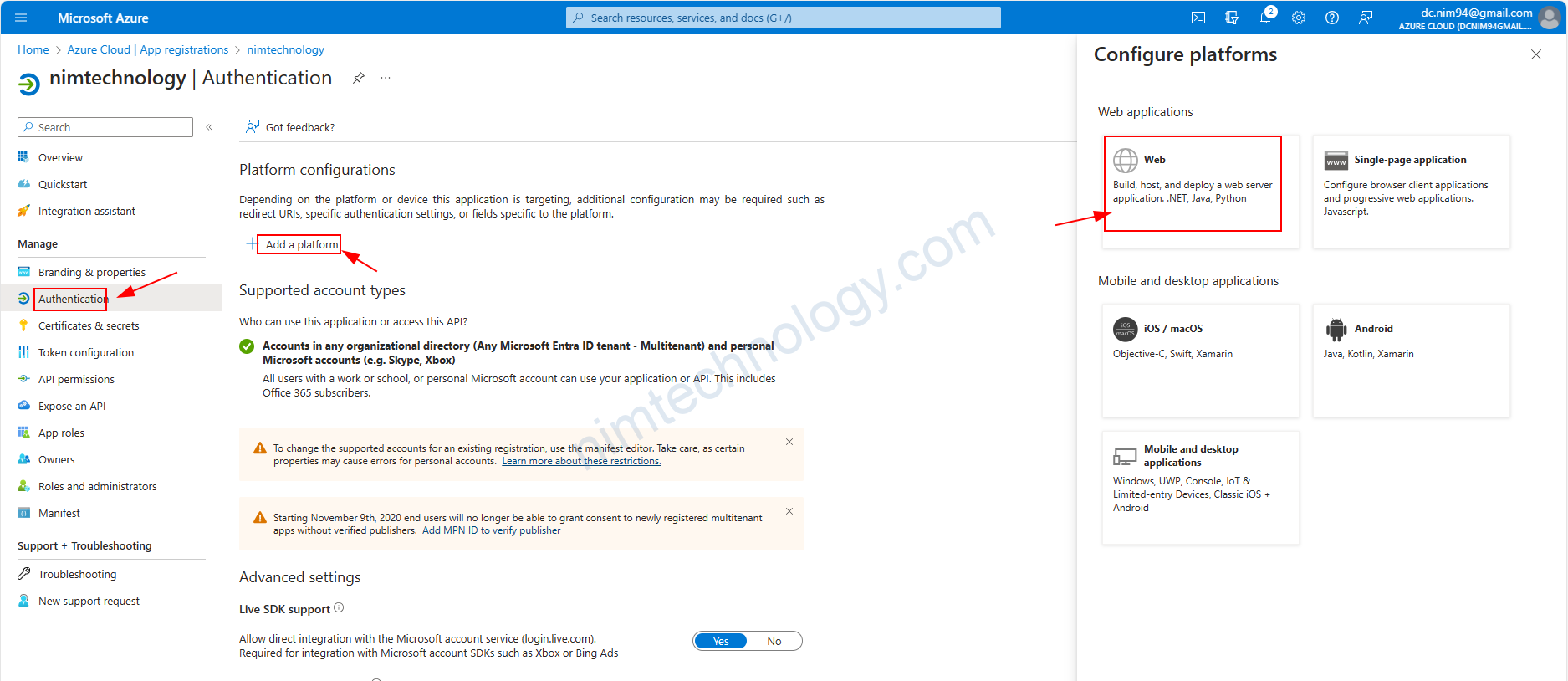
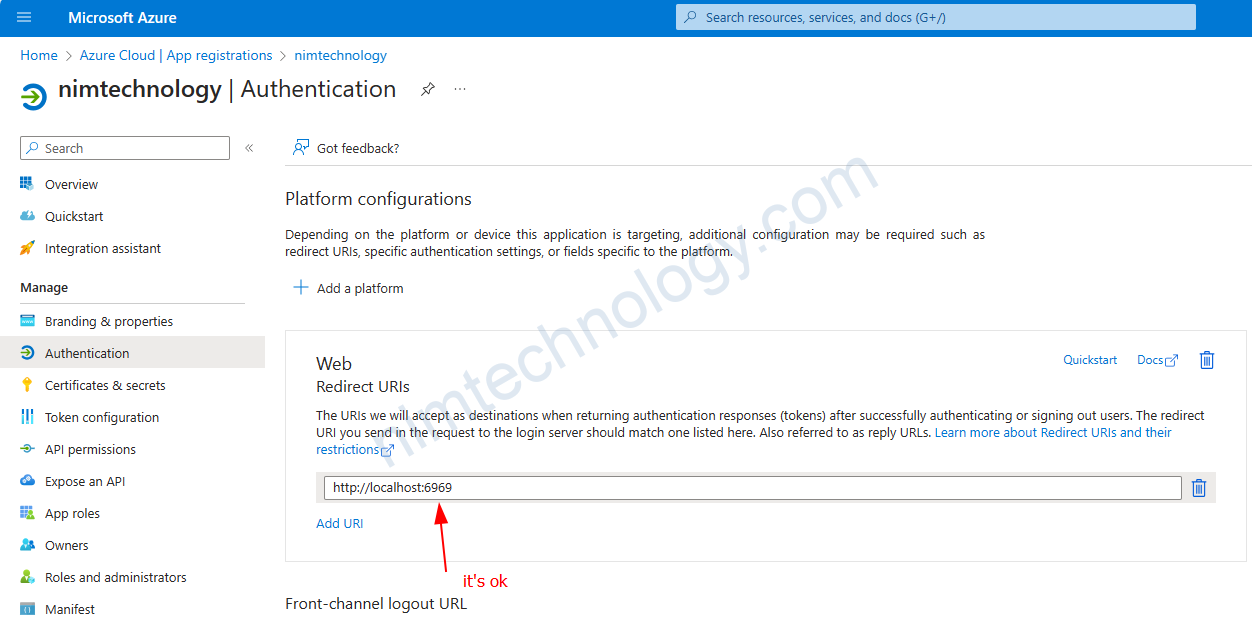
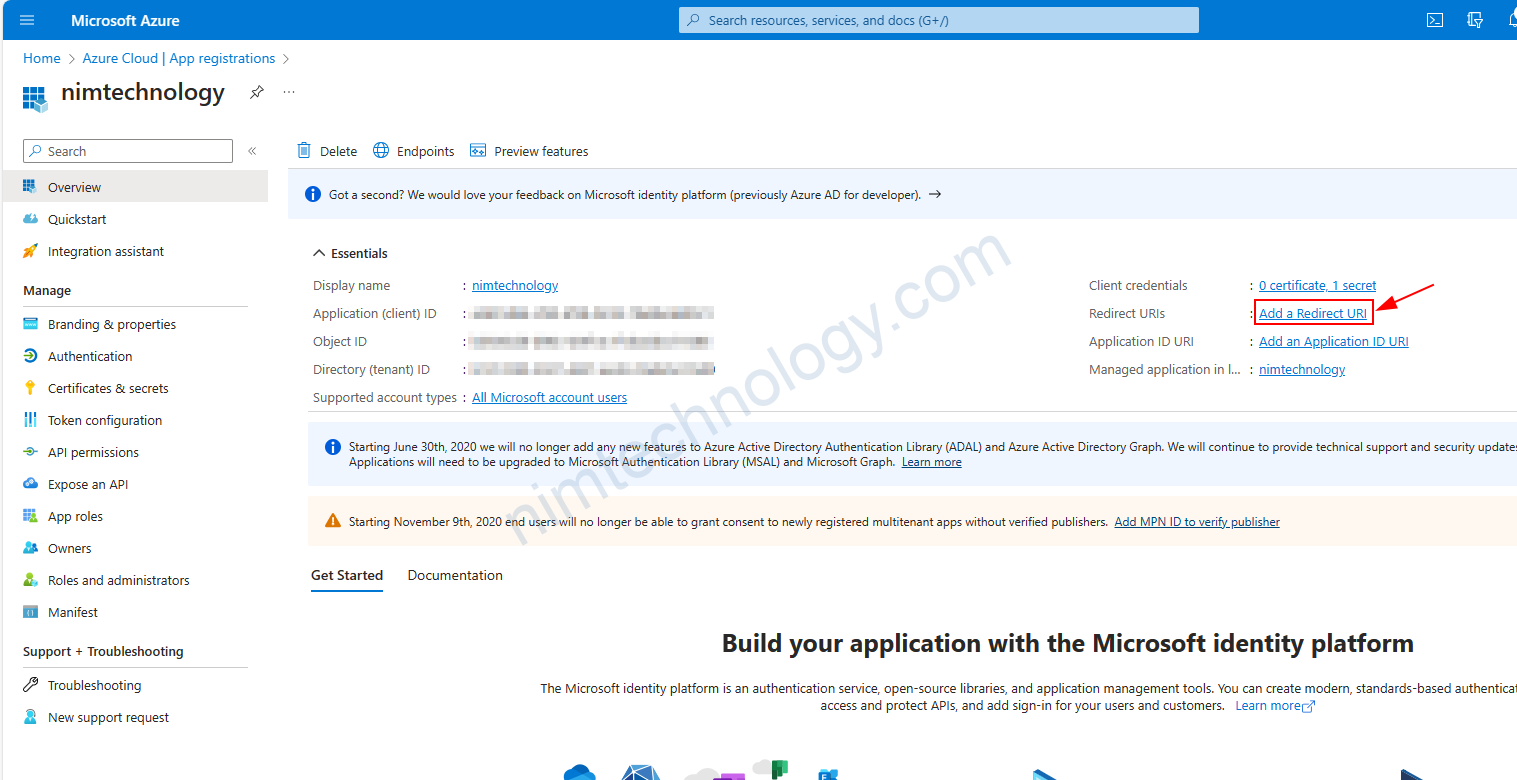
Để bước này hoạt động được chúng ta cần tạo redirect-uri: http://localhost:6969
Generate Authorization Code (One time).

https://learn.microsoft.com/en-us/azure/energy-data-services/how-to-generate-auth-token#generate-the-client-id-auth-token

Bạn cần follow command này;

curl --location --request POST 'https://login.microsoftonline.com/<tenant-id>/oauth2/token' \
--header 'Content-Type: application/x-www-form-urlencoded' \
--data-urlencode 'grant_type=client_credentials' \
--data-urlencode 'scope=<client-id>.default' \
--data-urlencode 'client_id=<client-id>' \
--data-urlencode 'client_secret=<client-secret>' \
--data-urlencode 'resource=<client-id>'

Kết quả trả về trông giống như thế này:

    {
        "token_type": "Bearer",
        "expires_in": 86399,
        "ext_expires_in": 86399,
        "access_token": "abcdefgh123456............."
    }

Bạn pase test được chuẩn bị bên dưới lên browser

https://login.microsoftonline.com/<tenant-id>/oauth2/v2.0/authorize?client_id=<client-id>
&response_type=code
&redirect_uri=<redirect-uri>
&response_mode=query
&scope=<client-id>%2f.default&state=12345&sso_reload=true

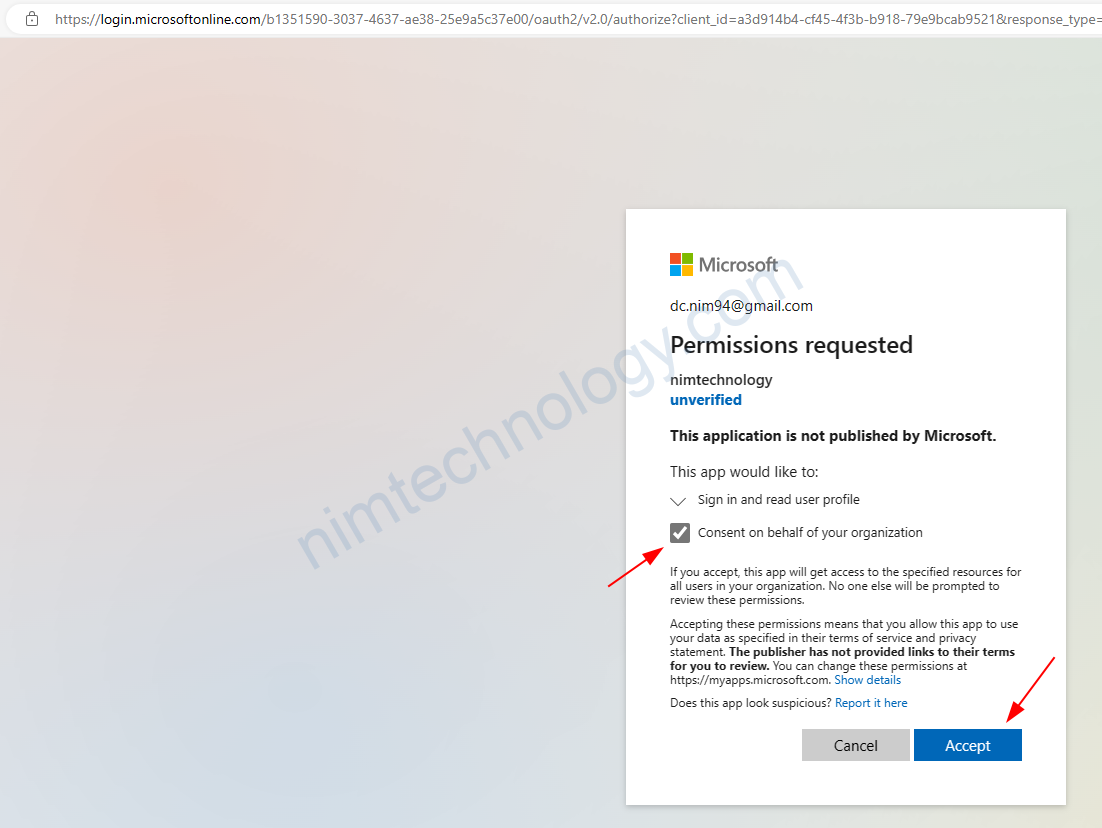
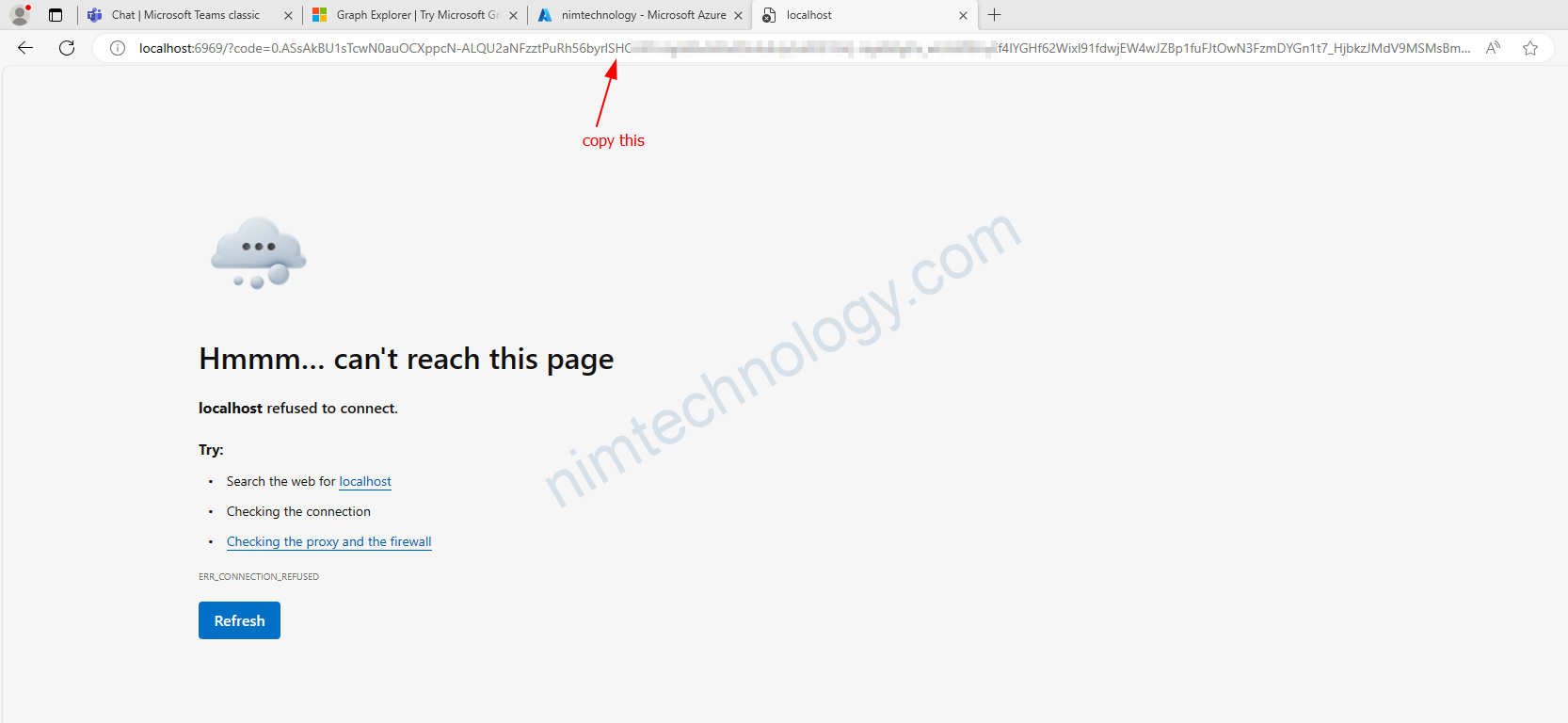
Nó sẽ có dạng như sau:

Sau khi bạn past là editor nào đó thì bạn sẽ cần copy code = “” nó sẽ trước chữ state.

Get an auth token and a refresh token

curl -X POST -H "Content-Type: application/x-www-form-urlencoded" -d 'client_id=<client-id>
  &scope=<client-id>%2f.default openid profile offline_access
  &code=<authorization-code>
  &redirect_uri=<redirect-uri>
  &grant_type=authorization_code
  &client_secret=<client-secret>' 'https://login.microsoftonline.com/<tenant-id>/oauth2/v2.0/token'

Code thì bạn lấy ở bước trên.

và output như này:

{
  "token_type": "Bearer",
  "scope": "User.Read profile openid email",
  "expires_in": 4557,
  "access_token": "eyJ0eXAiOiJKV1QiLCJub25jZSI6IkJuUXdJd0ZFc...",
  "refresh_token": "0.ARoAv4j5cvGGr0GRqy180BHbR8lB8cvIWGtHpawGN..."
}

Generate new Access Token From a refresh token

https://learn.microsoft.com/en-us/graph/auth-v2-user?tabs=curl#5-use-the-refresh-token-to-renew-an-expired-access-token

curl --location --request POST 'https://login.microsoftonline.com/{tenant}/oauth2/v2.0/token' \
--header 'Content-Type: application/x-www-form-urlencoded' \
--data-urlencode 'client_id=11111111-1111-1111-1111-111111111111' \
--data-urlencode 'refresh_token=OAAABAAAAiL9Kn2Z27UubvWFPbm0gLWQJVzCTE9UkP3pSx1aXxUjq...' \
--data-urlencode 'grant_type=refresh_token' \
--data-urlencode 'client_secret=jXoM3iz...'

ở đây tại mình chưa cấp quyền “User.Read Mail.Read” nên mình sử dụng được line –data-urlencode ‘scope=User.Read Mail.Read’

và cái respone chúng ta nhận về sẽ như sau

HTTP/1.1 200 OK
Content-type: application/json

{
    "access_token": "eyJ0eXAiOiJKV1QiLCJhbGciOiJSUzI1NiIsIng1dCI6Ik5HVEZ2ZEstZnl0aEV1Q...",
    "token_type": "Bearer",
    "expires_in": 3599,
    "scope": "Mail.Read User.Read",
    "refresh_token": "AwABAAAAvPM1KaPlrEqdFSBzjqfTGAMxZGUTdM0t4B4...",
}

Azure Cloud

Post navigation

Previous Post: [Ingress-nginx] Snippet directives are disabled by the Ingress administrator
Next Post: [Argocd – Azure] Login to ArgoCD using Microsoft or Azure Accounts.

More Related Articles

[Argocd – Azure] Login to ArgoCD using Microsoft or Azure Accounts. ArgoCD
Learn interesting things about VM type on Azure Azure Cloud
Beautiful Infratructure AWS - Amazon Web Service
Create Service Bus on azure Azure Cloud
[Azure/MongoDB] Creating Azure Cosmos DB for MongoDB (RU) Azure Cloud
[Azure] az command helpful Azure Cloud

Leave a Reply Cancel reply

Your email address will not be published. Required fields are marked *

Tham Gia Group DevOps nhé!
Để Nim có nhiều động lực ra nhiều bài viết.
Để nhận được những thông báo mới nhất.

Recent Posts

  • [Rancher/EKS] Rancher from v2.12.x can not work on eks cluster. April 15, 2026
  • [Telegram/Openclaw] Configure openclaw bot in a Telegram group. March 31, 2026
  • Tutorial: Gateway API + Traefik + oauth2-proxy (Microsoft Entra ID) March 30, 2026
  • Full + incremental backup: When restoring, do deleted files come back? March 27, 2026
  • [K8S] Create long-lived kubeconfig on k8s March 23, 2026

Archives

  • April 2026
  • March 2026
  • February 2026
  • January 2026
  • December 2025
  • November 2025
  • October 2025
  • September 2025
  • August 2025
  • July 2025
  • June 2025
  • May 2025
  • April 2025
  • March 2025
  • February 2025
  • January 2025
  • December 2024
  • November 2024
  • October 2024
  • September 2024
  • August 2024
  • July 2024
  • June 2024
  • May 2024
  • April 2024
  • March 2024
  • February 2024
  • January 2024
  • December 2023
  • November 2023
  • October 2023
  • September 2023
  • August 2023
  • July 2023
  • June 2023
  • May 2023
  • April 2023
  • March 2023
  • February 2023
  • January 2023
  • December 2022
  • November 2022
  • October 2022
  • September 2022
  • August 2022
  • July 2022
  • June 2022
  • May 2022
  • April 2022
  • March 2022
  • February 2022
  • January 2022
  • December 2021
  • November 2021
  • October 2021
  • September 2021
  • August 2021
  • July 2021
  • June 2021

Categories

  • AI
    • OpenClaw
  • BareMetal
    • NextCloud
  • CI/CD
    • Argo Events
    • ArgoCD
    • ArgoWorkflows
    • Git
      • Bitbucket
    • Harbor
    • Jenkins
    • Spinnaker
    • TeamCity
  • Coding
    • DevSecOps
    • Golang
    • Jquery & JavaScript
    • Laravel
    • NextJS 14 & ReactJS & Type Script
    • Python
    • Selenium
    • Terraform
      • AWS – Amazon Web Service
      • Azure Cloud
      • GCP – Google Cloud
  • Kubernetes & Container
    • Apache Kafka
      • Kafka
      • Kafka Connect
      • Lenses
    • Docker
    • Helm Chart
    • Isito-EnvoyFilter
    • Kong Gateway
    • Kubernetes
      • Gateway API
      • Ingress
      • Pod
    • Longhorn – Storage
    • MetalLB
    • OAuth2 Proxy
    • Vault
    • VictoriaMetrics
  • Log, Monitor & Tracing
    • DataDog
    • ELK
      • Kibana
      • Logstash
    • Fluent
    • Grafana
    • Prometheus
  • Uncategorized
  • Admin

Copyright © 2026 NimTechnology.