Skip to content

NimTechnology

Trình bày các công nghệ CLOUD một cách dễ hiểu.

  • Kubernetes & Container
    • Docker
    • Kubernetes
      • Gateway API
      • Ingress
      • Pod
    • Helm Chart
    • OAuth2 Proxy
    • Isito-EnvoyFilter
    • Apache Kafka
      • Kafka
      • Kafka Connect
      • Lenses
    • Vault
    • Longhorn – Storage
    • VictoriaMetrics
    • MetalLB
    • Kong Gateway
  • CI/CD
    • ArgoCD
    • ArgoWorkflows
    • Argo Events
    • Spinnaker
    • Jenkins
    • Harbor
    • TeamCity
    • Git
      • Bitbucket
  • Coding
    • DevSecOps
    • Terraform
      • GCP – Google Cloud
      • AWS – Amazon Web Service
      • Azure Cloud
    • Golang
    • Laravel
    • Python
    • Jquery & JavaScript
    • Selenium
  • Log, Monitor & Tracing
    • DataDog
    • Prometheus
    • Grafana
    • ELK
      • Kibana
      • Logstash
  • BareMetal
    • NextCloud
  • Toggle search form

[Teamcity] How to transfer the value from pipeline A to pipeline B

Posted on June 9, 2025June 9, 2025 By nim No Comments on [Teamcity] How to transfer the value from pipeline A to pipeline B

Làm thể nào để ta có thể chia sẽ value từ pipline A sang pipeline B

Ở step này thì nẽ build ra file .jar
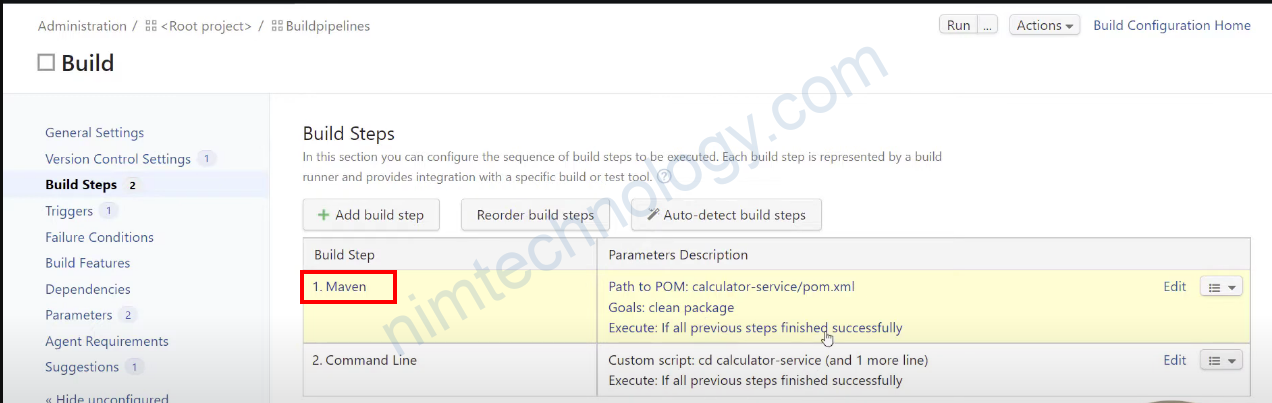
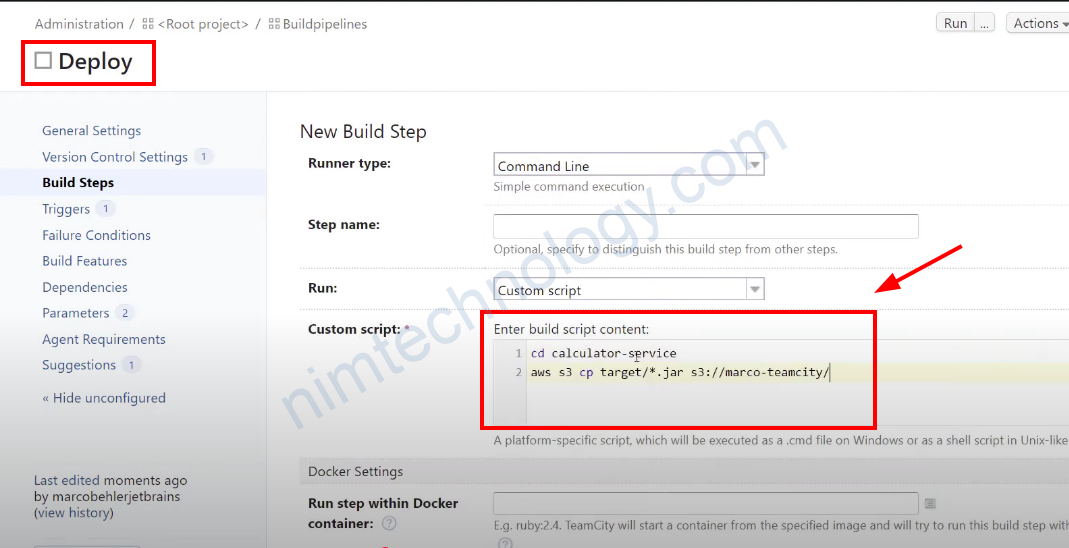
Tiếp đến bạn tạo 1 Pipeline khác.
Để copy các artifacts và đẩy lên S3.
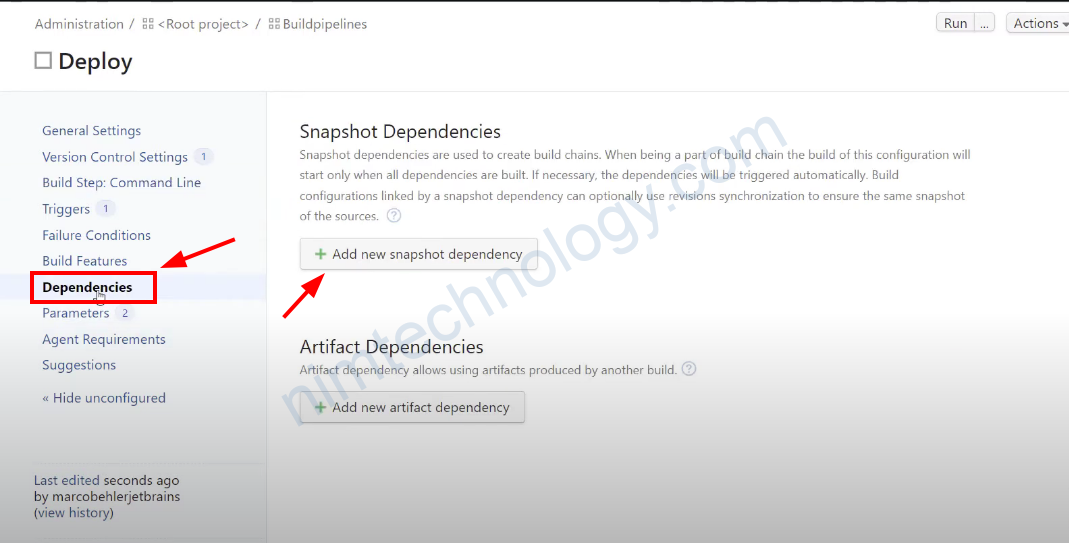
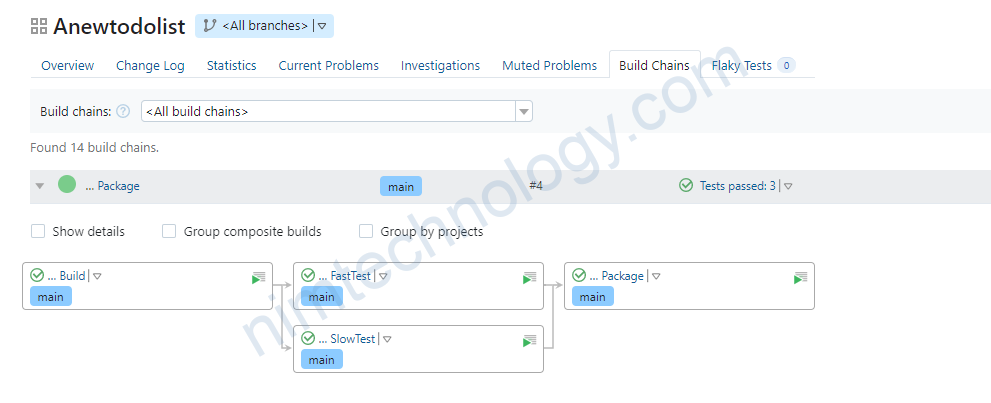
Mục tiêu của chúng ta là Pipeline Deploy sẽ copy các Artifact của Pipeline Build
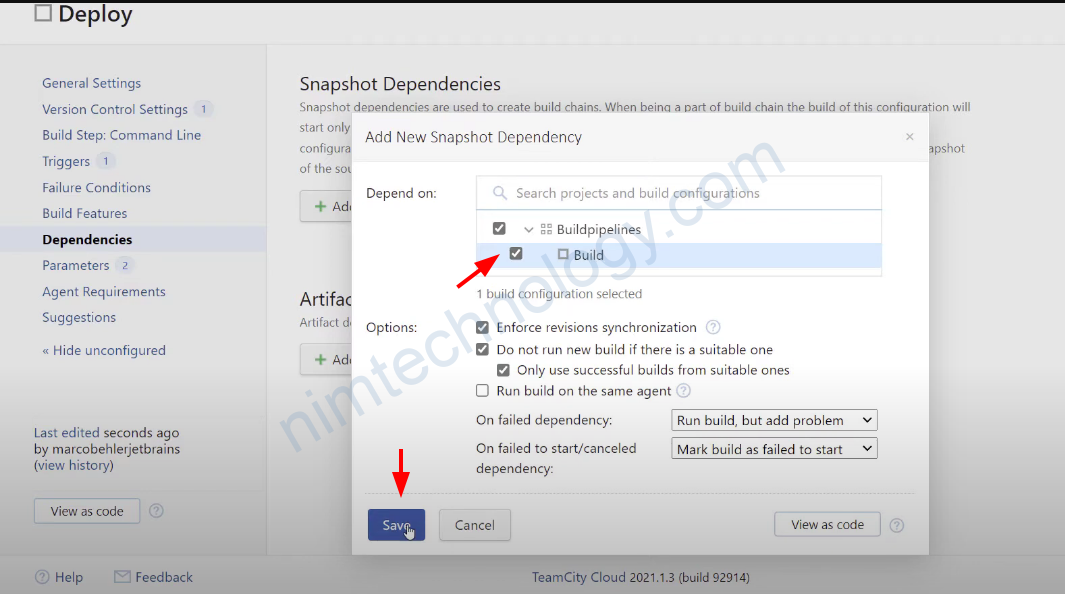
Lúc này thì Pipeline Deploy sẽ depend vào Pipeline B =>
Bạn cần chọn như hình.

Tiếp theo để share artifact giữa hai pipeline thì bạn tiếp tục click vào artifact.
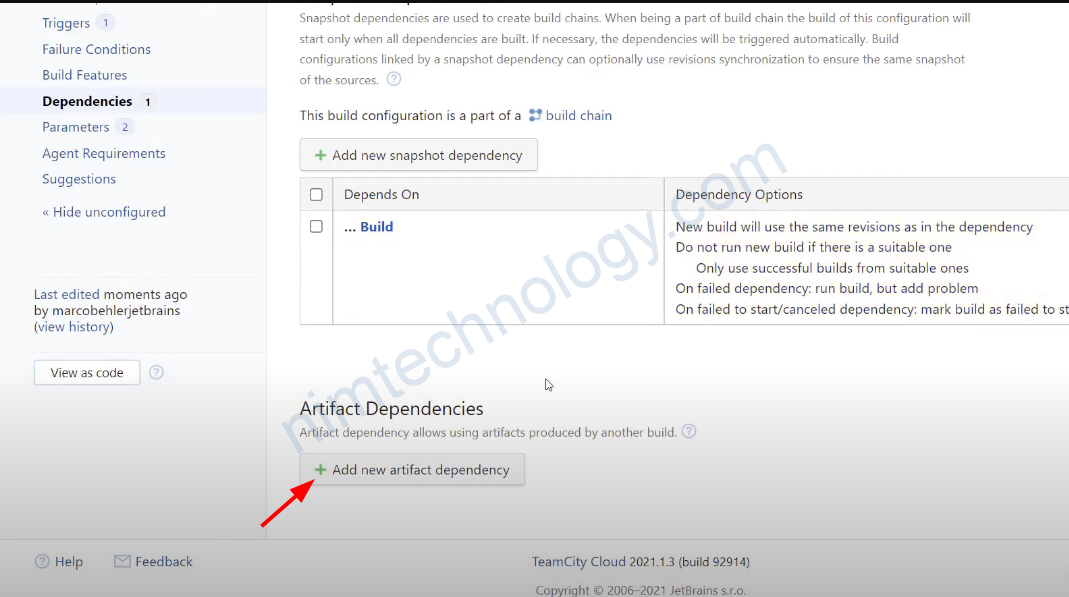
Bạn có thể thấy các gợi ý artifact có sẵn của pipeline A
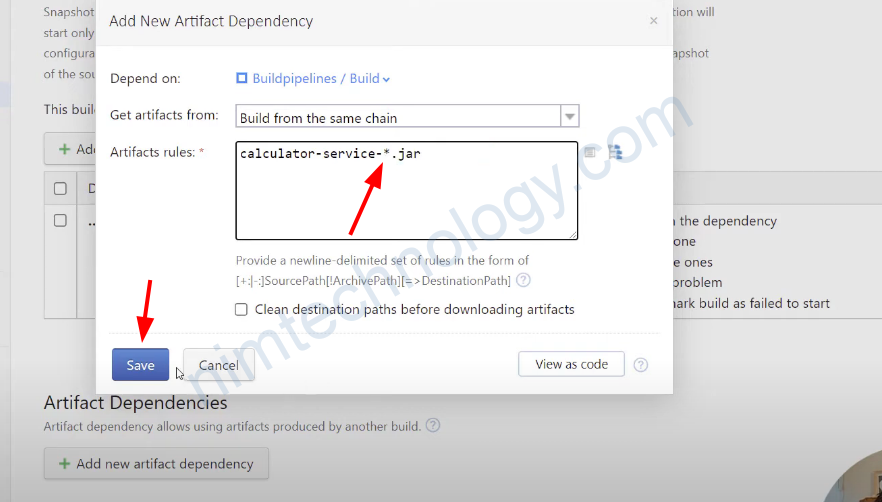
Bạn thực hiện edit artifact rules để scope nó rộng hơn bằng cách thêm dấu * (sao)

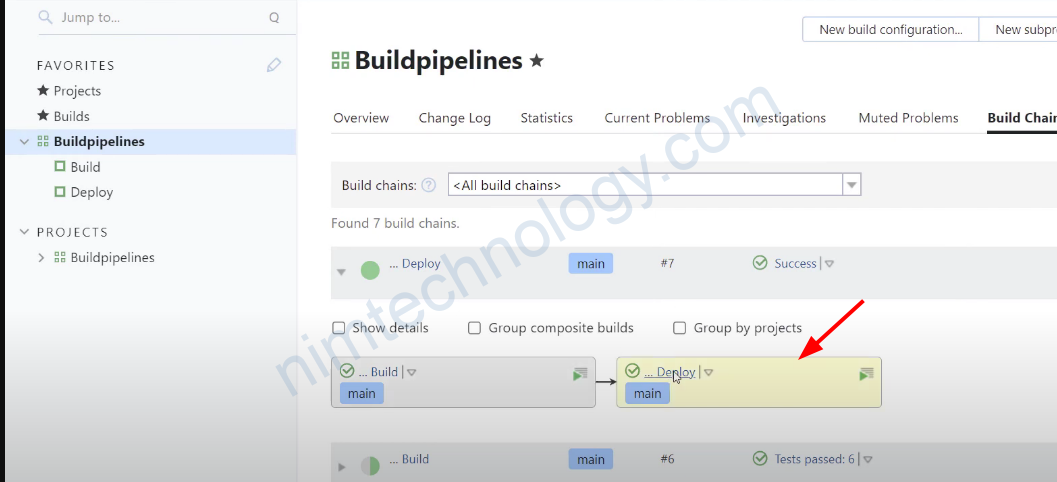
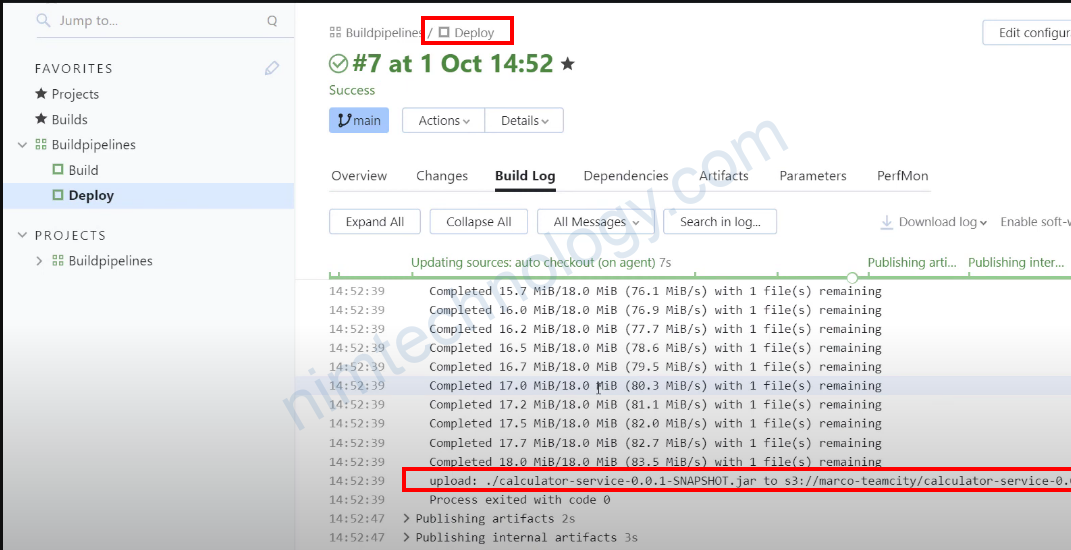
Bạn thấy là pipeline Deploy đã copy được artifact của pipeline Build và đẩy lên S3

Ngoài ra Teamcity còn cho phép Pass Build Parameters

  • TeamCity allows you to pass parameter values from one build configuration to another in a build chain. In Pipeline B, you can reference parameters from Pipeline A using the following syntax:
%dep.<PipelineA_ID>.<parameterName>%
  • Replace <PipelineA_ID> with the build configuration ID of Pipeline A and <parameterName> with the name of the parameter you want to access63.
  • For example, if Pipeline A sets a parameter called version, Pipeline B can reference it as:
%dep.PipelineA.version%

This works for any parameter defined or set in Pipeline A, including environment variables or custom parameters
https://stackoverflow.com/questions/36774070/passing-the-configuration-variable-on-teamcity
TeamCity

Post navigation

Previous Post: [Windows] Remove the process that consumes too much CPU.
Next Post: [Bitbucket] Git Clone/Pull/Push with Bitbucket through API Token.

More Related Articles

[TeamCity] Kotlin DSL – Lesson 2 – DSL Basics TeamCity
[Teamcity] Kotlin codes on Git(repository) are conflicted with the TeamCity UI. TeamCity
[Teamcity] What tools are best to code “Kotlin DSL” in Teamcity TeamCity
[TeamCity] Kotlin DSL – Lesson 1: Project Setup TeamCity
[Teamcity] How does TeamCity login and pull/push images to the private Docker HUB TeamCity
[Team City] Working with Projects and Build Configurations TeamCity

Leave a Reply Cancel reply

Your email address will not be published. Required fields are marked *

Tham Gia Group DevOps nhé!
Để Nim có nhiều động lực ra nhiều bài viết.
Để nhận được những thông báo mới nhất.

Recent Posts

  • [Rancher/EKS] Rancher from v2.12.x can not work on eks cluster. April 15, 2026
  • [Telegram/Openclaw] Configure openclaw bot in a Telegram group. March 31, 2026
  • Tutorial: Gateway API + Traefik + oauth2-proxy (Microsoft Entra ID) March 30, 2026
  • Full + incremental backup: When restoring, do deleted files come back? March 27, 2026
  • [K8S] Create long-lived kubeconfig on k8s March 23, 2026

Archives

  • April 2026
  • March 2026
  • February 2026
  • January 2026
  • December 2025
  • November 2025
  • October 2025
  • September 2025
  • August 2025
  • July 2025
  • June 2025
  • May 2025
  • April 2025
  • March 2025
  • February 2025
  • January 2025
  • December 2024
  • November 2024
  • October 2024
  • September 2024
  • August 2024
  • July 2024
  • June 2024
  • May 2024
  • April 2024
  • March 2024
  • February 2024
  • January 2024
  • December 2023
  • November 2023
  • October 2023
  • September 2023
  • August 2023
  • July 2023
  • June 2023
  • May 2023
  • April 2023
  • March 2023
  • February 2023
  • January 2023
  • December 2022
  • November 2022
  • October 2022
  • September 2022
  • August 2022
  • July 2022
  • June 2022
  • May 2022
  • April 2022
  • March 2022
  • February 2022
  • January 2022
  • December 2021
  • November 2021
  • October 2021
  • September 2021
  • August 2021
  • July 2021
  • June 2021

Categories

  • AI
    • OpenClaw
  • BareMetal
    • NextCloud
  • CI/CD
    • Argo Events
    • ArgoCD
    • ArgoWorkflows
    • Git
      • Bitbucket
    • Harbor
    • Jenkins
    • Spinnaker
    • TeamCity
  • Coding
    • DevSecOps
    • Golang
    • Jquery & JavaScript
    • Laravel
    • NextJS 14 & ReactJS & Type Script
    • Python
    • Selenium
    • Terraform
      • AWS – Amazon Web Service
      • Azure Cloud
      • GCP – Google Cloud
  • Kubernetes & Container
    • Apache Kafka
      • Kafka
      • Kafka Connect
      • Lenses
    • Docker
    • Helm Chart
    • Isito-EnvoyFilter
    • Kong Gateway
    • Kubernetes
      • Gateway API
      • Ingress
      • Pod
    • Longhorn – Storage
    • MetalLB
    • OAuth2 Proxy
    • Vault
    • VictoriaMetrics
  • Log, Monitor & Tracing
    • DataDog
    • ELK
      • Kibana
      • Logstash
    • Fluent
    • Grafana
    • Prometheus
  • Uncategorized
  • Admin

Copyright © 2026 NimTechnology.