Packages
Cài đặt và Cấu hình các Package Laravel
Install Laravel Socialite:
composer require laravel/socialiteInstall the Azure Socialite Provider:
composer require socialiteproviders/microsoft-azureAdd Environment Variables:
Mở tệp .env của bạn và thêm thông tin xác thực bạn đã lấy từ Azure:
AZURE_CLIENT_ID="your-application-client-id"
AZURE_CLIENT_SECRET="your-client-secret-value"
AZURE_TENANT_ID="your-directory-tenant-id"
AZURE_REDIRECT_URI="http://localhost:8000/auth/callback"Sau đó run:
php artisan config:clear && php artisan cache:clearConfigure Services
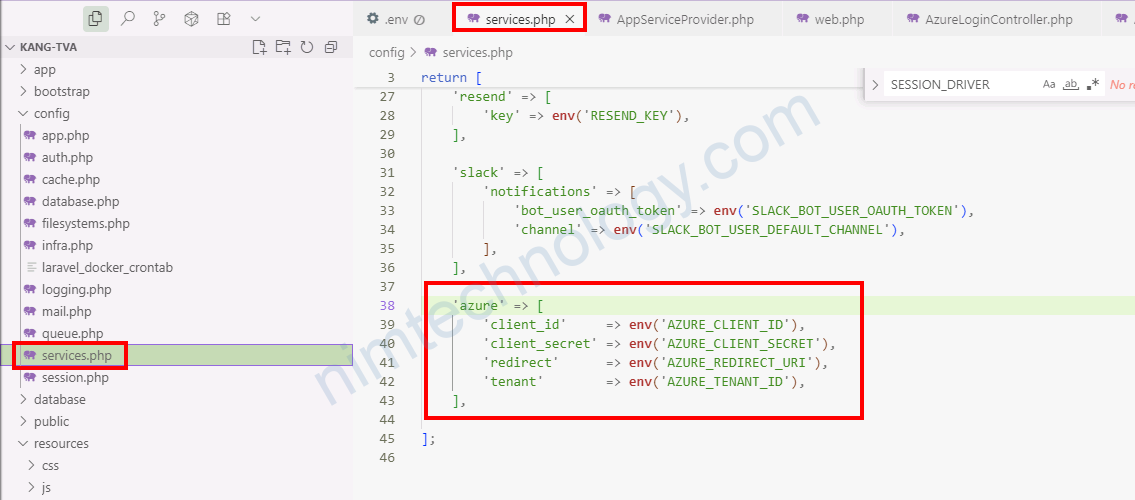
In your config/services.php file, add the configuration for the Azure provider :
'azure' => [
    'client_id'     => env('AZURE_CLIENT_ID'),
    'client_secret' => env('AZURE_CLIENT_SECRET'),
    'redirect'      => env('AZURE_REDIRECT_URI'),
    'tenant'        => env('AZURE_TENANT_ID'),
],
Register the Event Listener
Laravel 11+ removed the EventServiceProvider from the app skeleton; register the Socialite provider via the Event facade in AppServiceProvider::boot.
// app/Providers/AppServiceProvider.php
use Illuminate\Support\Facades\Event;
use SocialiteProviders\Manager\SocialiteWasCalled;
use SocialiteProviders\Azure\Provider as AzureProvider;

public function boot(): void
{
    Event::listen(function (SocialiteWasCalled $event) {
        $event->extendSocialite('azure', AzureProvider::class);
    });
}
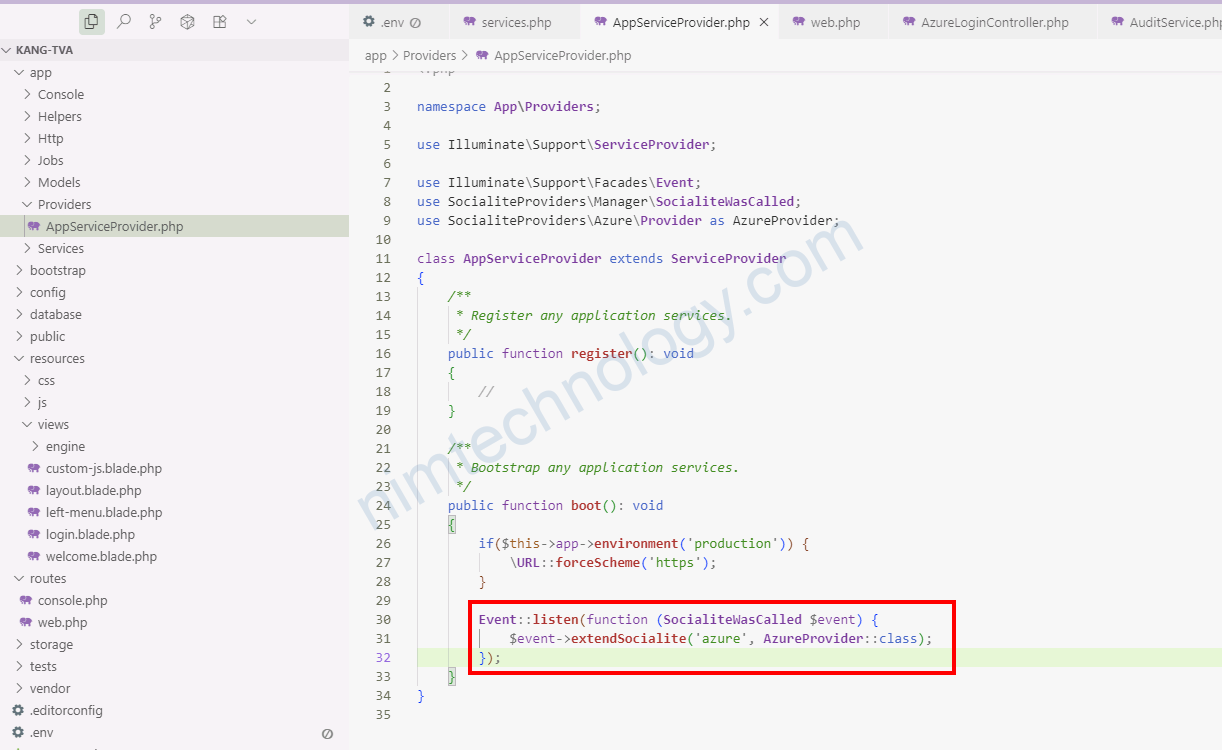
After this, Socialite::driver(‘azure’) becomes available.
If on Laravel 10 or earlier, add the listener in EventServiceProvider.
// app/Providers/EventServiceProvider.php
protected $listen = [
    \SocialiteProviders\Manager\SocialiteWasCalled::class => [
        \SocialiteProviders\Azure\AzureExtendSocialite::class.'@handle',
    ],
];
Azure App Registration
- Add a Redirect URI of type Web: https://your-domain.com/kangtva/auth/callback (match your real host; for local: http://localhost/kangtva/auth/callback).
- Enable ID tokens (OAuth 2.0).
- Recommended scopes: openid, profile, email.
- Note your Client ID, Client Secret, and Tenant ID.
Routes
- Protect app routes with auth middleware.
- Keep login public and named login.azure.
- Callback route must match your Azure Redirect URI.
Route::middleware('auth')->group(function () {
    // your protected routes...
});

Route::get('/login', [AzureLoginController::class, 'index'])->name('login.azure')->middleware
Add azure_id to users
Migration:
php artisan make:migration add_azure_id_to_users_table --table=users// in the migration's up()
Schema::table('users', function (Blueprint $table) {
$table->string('azure_id')->nullable()->unique()->after('id');
});php artisan migrateModel App\Models\User
protected $fillable = ['name', 'email', 'password', 'azure_id'];Controller
Create the Controller
Generate a new controller to manage the authentication logic:
php artisan make:controller Auth/AzureLoginControllerOpen the newly created app/Http/Controllers/Auth/AzureLoginController.php and add the following methods:
use Laravel\Socialite\Facades\Socialite;
use Illuminate\Support\Facades\Auth;
use App\Models\User;

public function redirectToAzure()
{
    return Socialite::driver('azure')
        ->scopes(['openid','profile','email'])
        ->redirect();
}

public function handleAzureCallback()
{
    try {
        $azure = Socialite::driver('azure')->user();
    } catch (\Throwable $e) {
        return redirect()->route('login')->with('error', 'Azure login failed.');
    }

    $email = $azure->getEmail()
        ?? ($azure->user['mail'] ?? $azure->user['userPrincipalName'] ?? null);

    $user = User::updateOrCreate(
        ['azure_id' => $azure->getId()],
        [
            'name' => $azure->getName() ?? $email ?? 'User',
            'email' => $email,
            'password' => bcrypt(str()->random(32)),
        ]
    );

    Auth::login($user);
    request()->session()->regenerate();

    return redirect()->intended('/');
}
Create the Login Page View
Finally, create a login button on your view that initiates the authentication process. In your resources/views/auth/login.blade.php file (or any other view), add a link to the Azure login route:
<!DOCTYPE html>
<html>
<head>
    <title>Login</title>
</head>
<body>
    <h1>Login</h1>
    <p>Please log in to continue.</p>

    <a href="{{ route('login.azure') }}">
        <button>Login with Microsoft Azure</button>
    </a>
</body>
</html>
Với các bước này đã hoàn tất, ứng dụng Laravel của bạn hiện đã được định cấu hình để xác thực người dùng thông qua Azure Active Directory. Khi người dùng nhấp vào nút “Login with Microsoft Azure“, họ sẽ được chuyển hướng đến Microsoft để đăng nhập và sau khi thành công, họ sẽ được chuyển hướng trở lại ứng dụng của bạn và tự động đăng nhập.